Cashier Instructions
1. Order Placement module下单模块
1.1 Ordering点单
1.1.1 Cash register ordering-packing 收银台点单-打包
1.1.2 Cash register - dine-in service 收银台-堂食
1.1.3 Ordering through a QR code for meal orders 点餐码点餐
1.1.4 Cashier - Self-service Ordering 收银台-自助点单
1.2 How to Pending Orderr/Retrieve Order 如何挂单/取单
1.3 discount area 折扣区
1.3.1 Single product discount/price adjustment 单商品折扣/改价
⭐1.3.2 Add discount 减价抹零
1.3.3 NO GST 整单免GST
1.3.4 Erase Service Charge 抹去服务费
1.4 Remarks 备注
1.4.1 Remarks for individual products 单商品备注
1.4.2 Notes on the entire order 整单备注
1.4.3 Edit Notes 编辑备注
1.5 Cancel All 整单取消
1.6 Cash box 手动开启钱箱
1.7 Split Tables/Merge Tables/Transfer Table 拆桌/合桌/转台
1.7.1 Split Tables 拆桌
1.7.2 Merge Tables 合桌
1.7.3 Transfer Table 转台
1.8 Payment 支付
1.8.1 General Payments 普通支付
1.8.2 Member Payments 会员支付
1.9 View Adjustments 视图调整
1.9.1 Modify the size of the category column 修改分类栏的尺寸
1.9.2 Product display with or without pictures 商品展示有图无图
1.9.3 Product sorting 商品排序
⭐1.10 Modify the Dish Name/Price/Edit 修改商品名称/价格/库存
1.10.1 Modify Name/Price 修改名称/价格
1.10.2 Modify the Edit修改商品库存
2. Membership 会员
2.1 Member creation and login 会员创建和登录
⭐2.2 View membership base information 查看会员基础信息
2.3 Member Recharge 会员充值
2.4 View member usage records 查看会员使用记录
⭐2.5 Issuance/use of membership coupons 会员优惠卷的发放/使用
3. KDS
3.1 How to Select Kitchen 如何切换厨房
3.2 Find orders quickly 快速查找订单
3.3 Complete the production of the order product 完成订单商品制作
3.4 Withdraw an order for pickup 撤回待取餐的订单
3.5 View the details of the order to be picked up 查看待取餐订单详情
3.6 Entering the Order 输入订单
3.6.1 Edit Shortcuts 编辑快捷方式
3.7 Pick up meals 取餐
3.8 Withdraw an order that has already been picked up 撤回已取餐的订单
4. Orders and reports 订单和报表
4.1 Orders 订单
⭐4.1.1 Inquiry Order 查询订单
4.1.2 Sending to the mailbox 发送到邮箱
⭐4.1.3 Modify the payment method 修改支付方式
4.1.4 Modify the order price 修改订单价格
4.1.5 Print Kitchen Order/Print Bill 再次厨打/打印小票
⭐4.1.6 Refunds 退款
4.1.7 Return to dine in 返回桌台
4.1.8 Cancel order 取消订单
4.2 Reports 报表
4.2.1 Daily Report 日结单
4.2.2 Hourly Sales Report 小时销售报表
4.2.3 Multi Day Report 选择多天查询
4.2.4 Member Marketing Report 会员营销报表
4.2.5 Cash box manual open record 钱箱手动开启记录
4.2.6 Business/shift data 营业/班次数据
4.2.7 View reports for non-current days 查看非当天的报表
4.2.8 Printing Reports 打印报表
5. Inventory 库存管理
6. Cash Manage 现金管理
6.1 Manually add income 手动添加收入
6.2 Manually add expenditure 手动添加支出
6.3 View historical settlement records 查看历史清算记录
6.4 How to liquidate 如何清算
6.5 Increase the reserve fund 增加备用金
7. Deposit and Queue 押金和排队
7.1 Deposit 押金
7.1.1 How to deposit 怎么记录押金
7.1.2 How to view/modify the deposit 怎么查看/修改押金
7.1.3 How to use the deposit 如何使用押金
7.2 Queue 排队
⭐common problem 常见问题
Adjust consumption points 调整消费积分
How to modify consumption points 如何修改消费积分
How can members add points after their first purchase and registration 会员首次消费后注册,如何添加积分
SMS top-up 短信充值
Ajuste de Idoma 调整语言
Cash register white screen 收银机白屏
he IP address of the cash register and the card machine is the same 收银台和刷卡机IP 地址一致
Exit the screen dominance mode 退出霸屏模式
Manually add member 收银台手动添加会员
How to use Open item 如何使用Open item
Receipt calculation 小票计算
Custom table Settings 自定义桌台设置
How to arrange the table 如何摆放桌子
How to add regional text 如何添加区域文字
How to delete content 如何删除内容
Coupon difference 优惠券
PR use PR使用
Order association PR 订单关联PR
Order cancellation/modification PR 订单取消/修改PR
-
+
首页
4.2.4 Member Marketing Report 会员营销报表
**It is convenient to view the consumption of member data 方便查看会员数据的消费情况** ## Operation process 操作流程 Click 'Member Marketing Report' to automatically preview the Affiliate Marketing Report receipt 点击‘会员营销报表’,自动预览会员营销报表小票 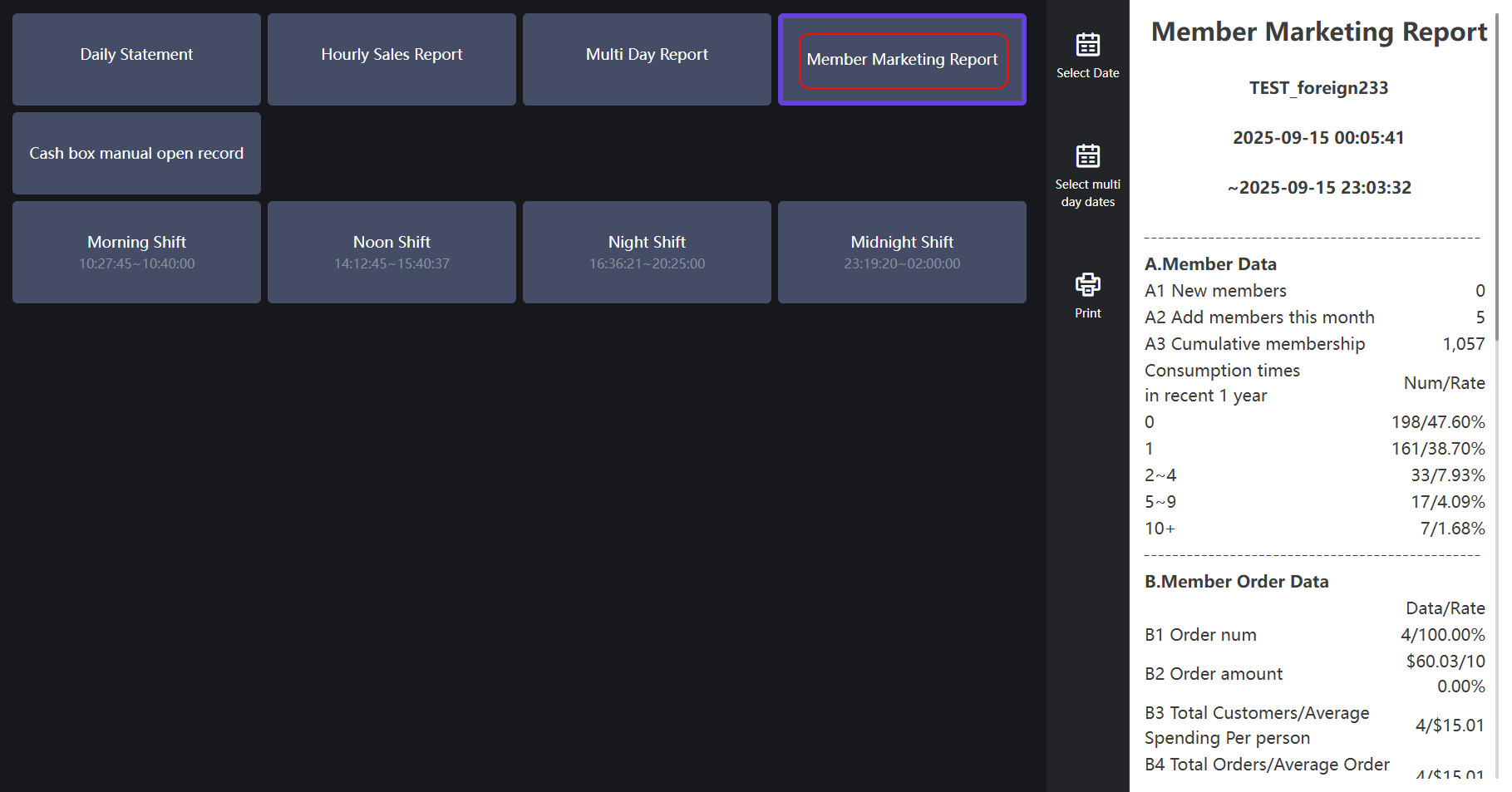 ## Display content 展示内容 ### A.Member Data 会员数据 A1、A2: Count the number of new members during business hours when you are currently logged in to the store A3: Count the number of all members of the current enterprise A4: The cumulative number of members spent in the past 1 year (**if the number of purchases is 0, it refers to the number of members who have registered but not used in the past year**) and the number of people/proportion (**the total number of people who have registered in the past year**) A1、A2:统计当前登录门店,营业时间内新增的会员数量 A3:统计当前企业所有会员数量 A4:近1年内会员累计消费次数(**显示消费次数为0的,指的是近一年内注册,但未使用的会员数量**)以及人数/占比(**占比人数/近一年消费人数总合**) 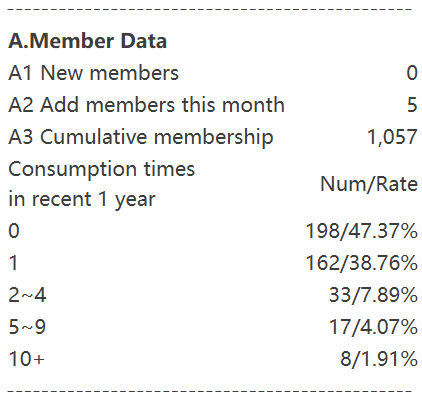 ### B.member order data 会员点单数据 B1: The proportion of the number of orders of logged-in members to the total number of orders during business hours B2: The proportion of the order amount of the logged-in member to the total order amount of all paid orders during business hours B3 - Number of diners: refers to the number of diners in all orders (**the default number of diners is 1 person for non-table orders or unselected people**) Average unit price: All order amounts/number of diners B4 - Total Orders: The number of all paid orders during business hours Average order price: The amount/quantity of all paid orders during business hours B1:营业时间内,所有已支付订单中,登录了会员的订单数量与总订单数量的占比 B2:营业时间内,所有已支付订单中,登录了会员的订单金额与总订单金额的占比 B3-用餐人数:指所有订单的用餐人数(**非桌台订单或未选人数默认就餐人数为1人**) 平均客单价:所有订单金额/用餐人数 B4-订单总数:营业时间内,所有已支付订单的数量 平均订单价:营业时间内,所有已支付订单的金额/数量 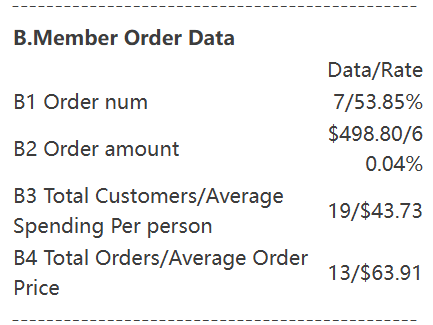 ### C商业积分数据 C1:指所有门店截止查询时间的会员余额总额 C2:指当前门店的今日充值总金额 C3:指营业时间内消耗的余额总额 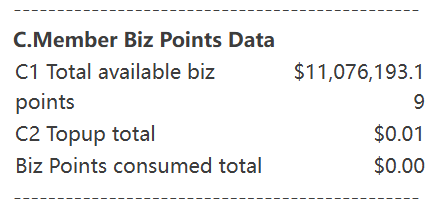 ### D. Member Loyalty Points Data 消费积分数据 D1: Refers to the total number of membership points at the cut-off time of all stores D2: Refers to the number of points earned by members through order gifts, new customer activities, recharge gifts and other channels on the day of the current store D3: Details of points consumed by members on the same day D4: Adjust the number of points of members in the management background (**negative for decreasing points, positive for increasing points**) D1:指所有门店的截止查询时间会员积分总数 D2:指当前门店,当天会员通过订单赠送、新客活动、充值赠送等渠道获得的积分数量 D3:当天会员消耗的积分明细 D4:在管理后台调整会员的积分数量统计(**减少积分为负,增加积分为正**) 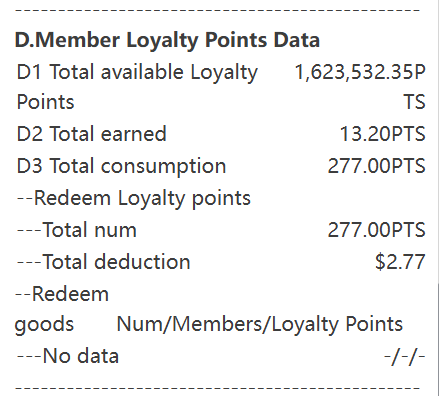 ### E.coupon data 优惠卷数据 Displays the name of the coupon that was consumed Number of write-offs: The total number of vouchers used today Sales: The total amount of the order corresponding to the voucher used today Proportion of total write-offs: The total number of coupons currently used in the total number of issued (**all stores**) 显示消耗的优惠卷名称 核销数:今日使用券的总数量 销售额:今日使用券对应的订单的总金额 总核销占比:该券目前已经使用的总数量在已经发放的总数量占比(**所有门店**) 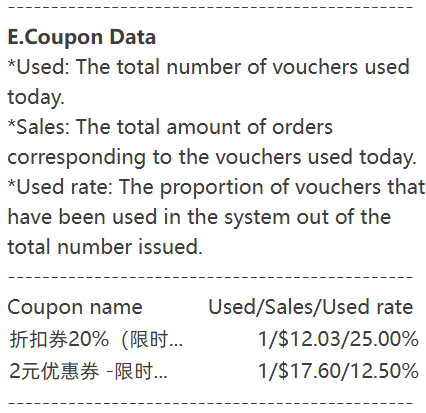
pos
2025年9月22日 13:41
转发文档
收藏文档
上一篇
下一篇
手机扫码
复制链接
手机扫一扫转发分享
复制链接
Markdown文件
PDF文档(打印)
分享
链接
类型
密码
更新密码