Cashier Instructions
1. Order Placement module下单模块
1.1 Ordering点单
1.1.1 Cash register ordering-packing 收银台点单-打包
1.1.2 Cash register - dine-in service 收银台-堂食
1.1.3 Ordering through a QR code for meal orders 点餐码点餐
1.1.4 Cashier - Self-service Ordering 收银台-自助点单
1.1.5 Independent table layout 独立桌码
1.1.6 Dynamic QR Code 动态桌码
1.2 How to Pending Orderr/Retrieve Order 如何挂单/取单
1.3 discount area 折扣区
1.3.1 Single product discount/price adjustment 单商品折扣/改价
⭐1.3.2 Add discount 减价抹零
1.3.3 NO GST 整单免GST
1.3.4 Erase Service Charge 抹去服务费
1.4 Remarks 备注
1.4.1 Remarks for individual products 单商品备注
1.4.2 Notes on the entire order 整单备注
1.4.3 Edit Notes 编辑备注
1.5 Cancel All 整单取消
1.6 Cash box 手动开启钱箱
1.7 Split Tables/Merge Tables/Transfer Table 拆桌/合桌/转台
1.7.1 Split Tables 拆桌
1.7.2 Merge Tables 合桌
1.7.3 Transfer Table 转台
1.8 Payment 支付
1.8.1 General Payments 普通支付
1.8.2 Member Payments 会员支付
1.9 View Adjustments 视图调整
1.9.1 Modify the size of the category column 修改分类栏的尺寸
1.9.2 Product display with or without pictures 商品展示有图无图
1.9.3 Product sorting 商品排序
⭐1.10 Modify the Dish Name/Price/Edit 修改商品名称/价格/库存
1.10.1 Modify Name/Price 修改名称/价格
1.10.2 Modify the Edit修改商品库存
1.11 Open item
1.12 Receipt Printing Confirmation 收银小票打印确认
2. Membership 会员
2.1 Member creation and login 会员创建和登录
⭐2.2 View membership base information 查看会员基础信息
2.3 Member Recharge 会员充值
2.4 View member usage records 查看会员使用记录
⭐2.5 Issuance/use of membership coupons 会员优惠卷的发放/使用
3. KDS
3.1 How to Select Kitchen 如何切换厨房
3.2 Find orders quickly 快速查找订单
3.3 Complete the production of the order product 完成订单商品制作
3.4 Withdraw an order for pickup 撤回待取餐的订单
3.5 View the details of the order to be picked up 查看待取餐订单详情
3.6 Entering the Order 输入订单
3.6.1 Edit Shortcuts 编辑快捷方式
3.7 Pick up meals 取餐
3.8 Withdraw an order that has already been picked up 撤回已取餐的订单
4. Orders and reports 订单和报表
4.1 Orders 订单
⭐4.1.1 Inquiry Order 查询订单
4.1.2 Sending to the mailbox 发送到邮箱
⭐4.1.3 Modify the payment method 修改支付方式
4.1.4 Modify the order price 修改订单价格
4.1.5 Print Kitchen Order/Print Bill 再次厨打/打印小票
⭐4.1.6 Refunds 退款
4.1.7 Return to dine in 返回桌台
4.1.8 Cancel order 取消订单
4.2 Reports 报表
4.2.1 Daily Report 日结单
4.2.2 Hourly Sales Report 小时销售报表
4.2.3 Multi Day Report 选择多天查询
4.2.4 Member Marketing Report 会员营销报表
4.2.5 Cash box manual open record 钱箱手动开启记录
4.2.6 Business/shift data 营业/班次数据
4.2.7 View reports for non-current days 查看非当天的报表
4.2.8 Printing Reports 打印报表
5. Inventory 库存管理
6. Cash Manage 现金管理
6.1 Manually add income 手动添加收入
6.2 Manually add expenditure 手动添加支出
6.3 View historical settlement records 查看历史清算记录
6.4 How to liquidate 如何清算
6.5 Increase the reserve fund 增加备用金
7. Deposit and Queue 押金和排队
7.1 Deposit 押金
7.1.1 How to deposit 怎么记录押金
7.1.2 How to view/modify the deposit 怎么查看/修改押金
7.1.3 How to use the deposit 如何使用押金
7.2 Queue 排队
⭐common problem 常见问题
Adjust consumption points 调整消费积分
How to modify consumption points 如何修改消费积分
How can members add points after their first purchase and registration 会员首次消费后注册,如何添加积分
SMS top-up 短信充值
Ajuste de Idoma 调整语言
Cash register white screen 收银机白屏
he IP address of the cash register and the card machine is the same 收银台和刷卡机IP 地址一致
Exit the screen dominance mode 退出霸屏模式
Manually add member 收银台手动添加会员
How to use Open item 如何使用Open item
Receipt calculation 小票计算
Custom table Settings 自定义桌台设置
How to arrange the table 如何摆放桌子
How to add regional text 如何添加区域文字
How to delete content 如何删除内容
Coupon difference 优惠券
PR use PR使用
Order association PR 订单关联PR
Order cancellation/modification PR 订单取消/修改PR
Difference between Takeaway & Virtual Table 打包&虚拟桌台的区别
Printer Failure Emergency Plan 打印机无法打印应急方案
-
+
首页
Difference between Takeaway & Virtual Table 打包&虚拟桌台的区别
> This operational guide helps store staff choose the correct workflow when a customer does not have a physical table, needs to pre-order, and defer payment. The system provides two solutions: [Takeaway Function] and [Virtual Table Function]. <br> 本操作指南旨在指导门店员工在“顾客无实体桌台、需要提前点餐,且暂不立即支付(稍后付款)”的业务场景下,如何正确选择系统功能。目前系统提供【打包功能】与【虚拟桌台功能】两种解决方案。 #### Module 1: Takeaway Function Standard SOP 模块一:【打包功能】标准操作指南 This function is designed for immediate on-site packing where customers order directly at the counter and take their food away. <br> 本功能主打到店即时打包场景,适配用户已到店、当场点餐、快速打包取餐的传统外带模式。 1. **Select Takeaway Order (选择打包点餐)**: Initiate a new order on the POS system and select the Takeaway option. <br> 1. **选择打包点餐**:在 POS 系统上发起新订单,并选择打包点餐功能。 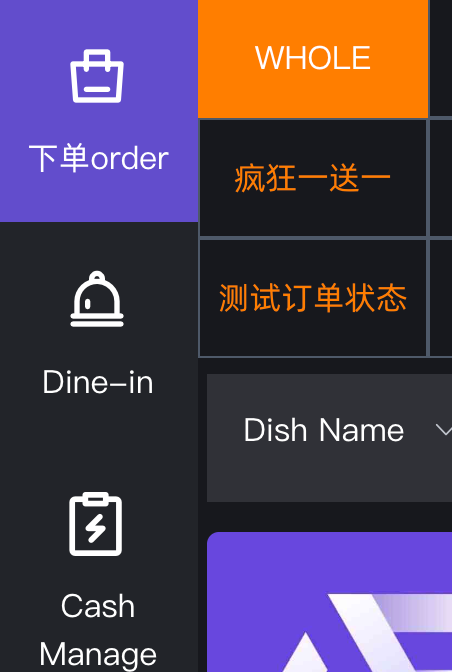 2. **Execute Hold Order (手动挂单操作)**: If the customer wants to pay later, the staff **must manually execute a "Hold Order" operation**. This stores the active order in the backend list. <br> 2. **手动挂单操作**:如果顾客需要暂不付款,员工**必须手动执行“挂单”操作**,将当前订单存入后台订单列表中。 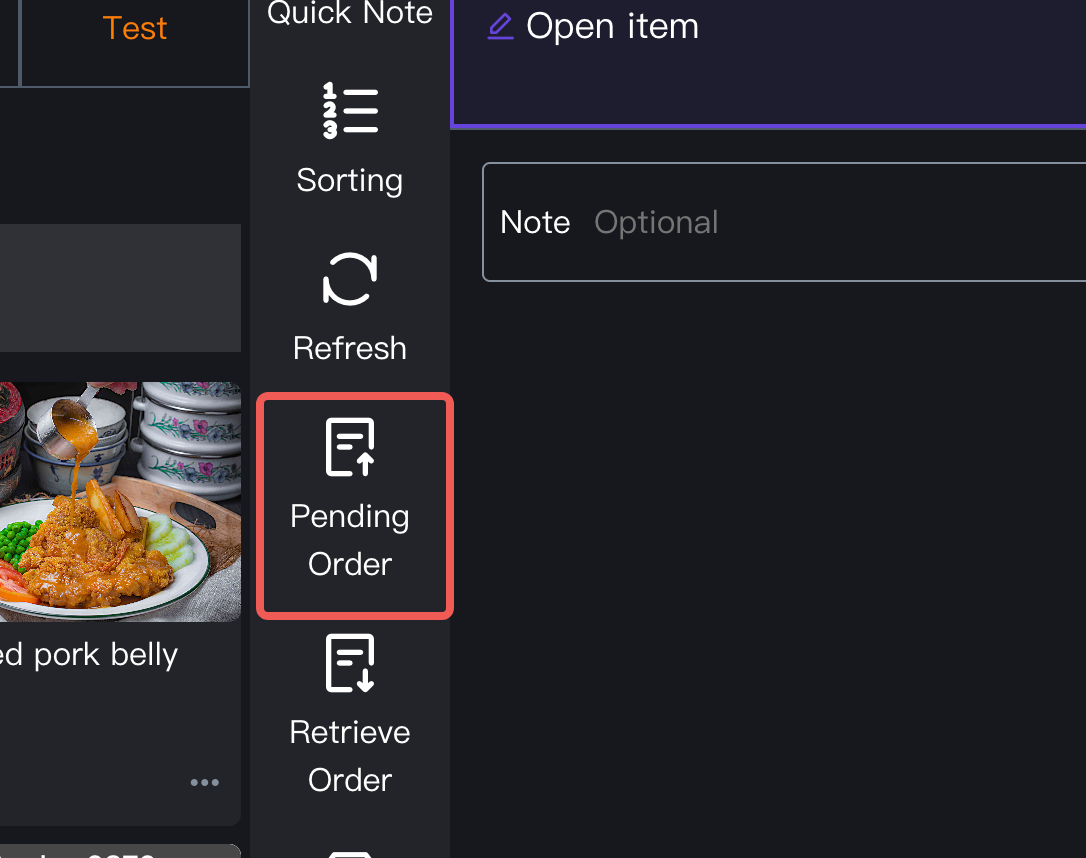 3. **Locate Order in List (查找挂单订单)**: When the customer returns to pay, the staff must exit the current screen, open the independent **Order List** page, and search for the corresponding held order. <br> 3. **查找挂单订单**:当顾客后续前来付款时,员工需跳出当前页面,进入独立的**订单列表**页面去查找对应的挂单订单。 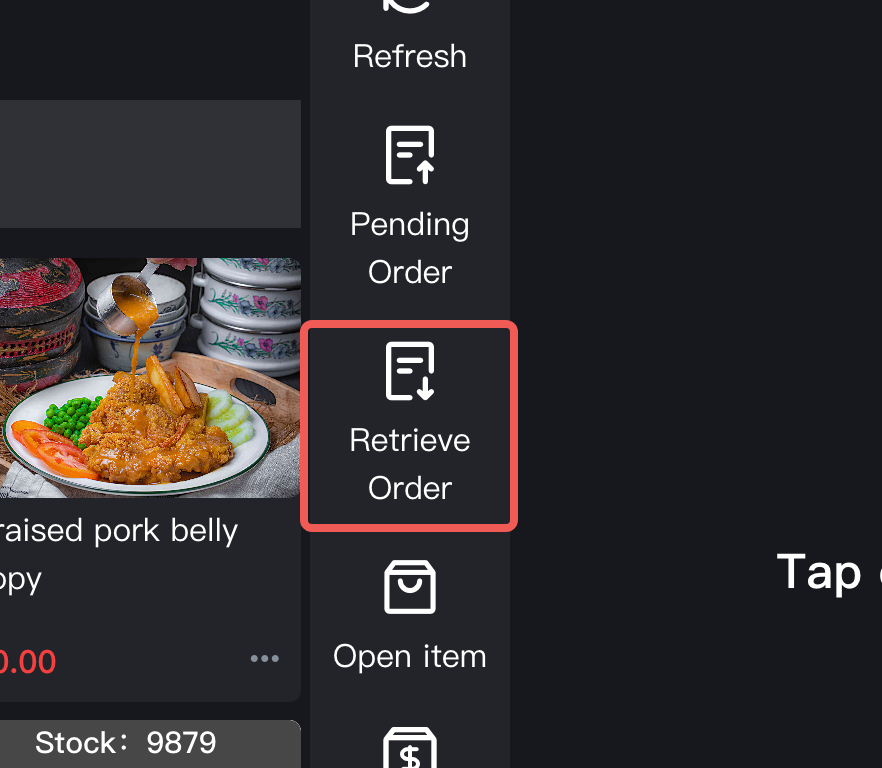 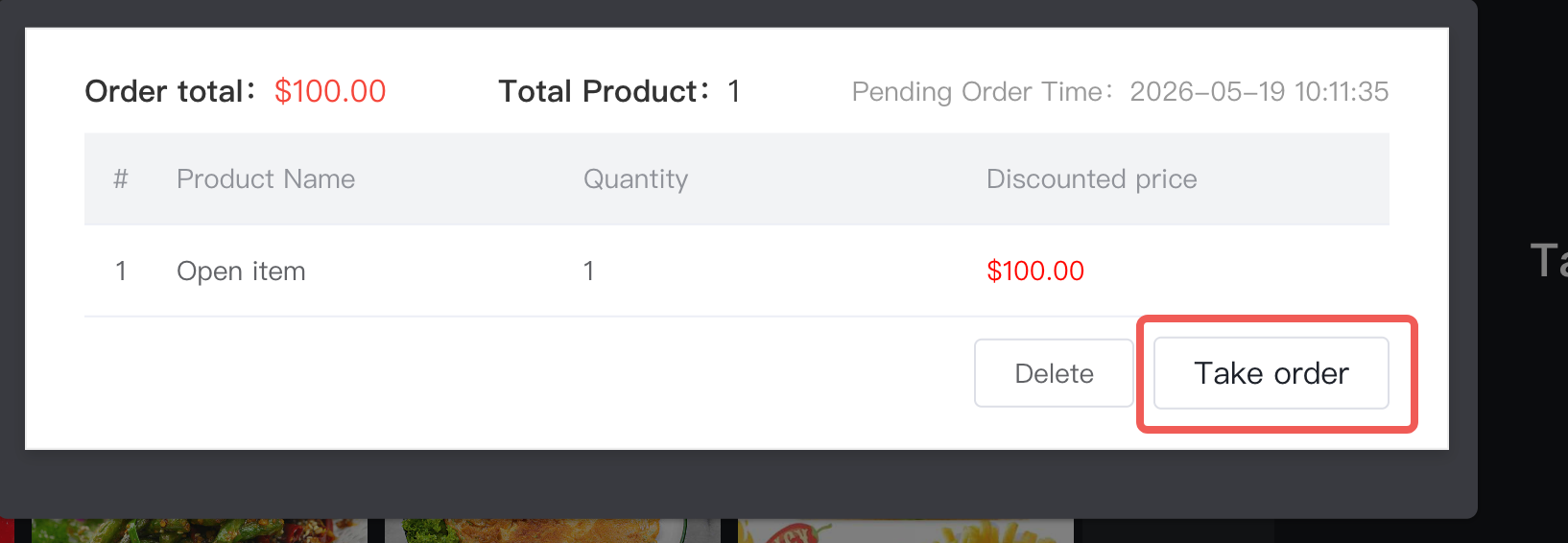 4. **Complete Payment & Take Item (结账与取餐)**: Process the payment and hand over the packed food items to the customer. <br> 4. **结账与取餐**:完成支付流程,将打包好的餐品交接给顾客。 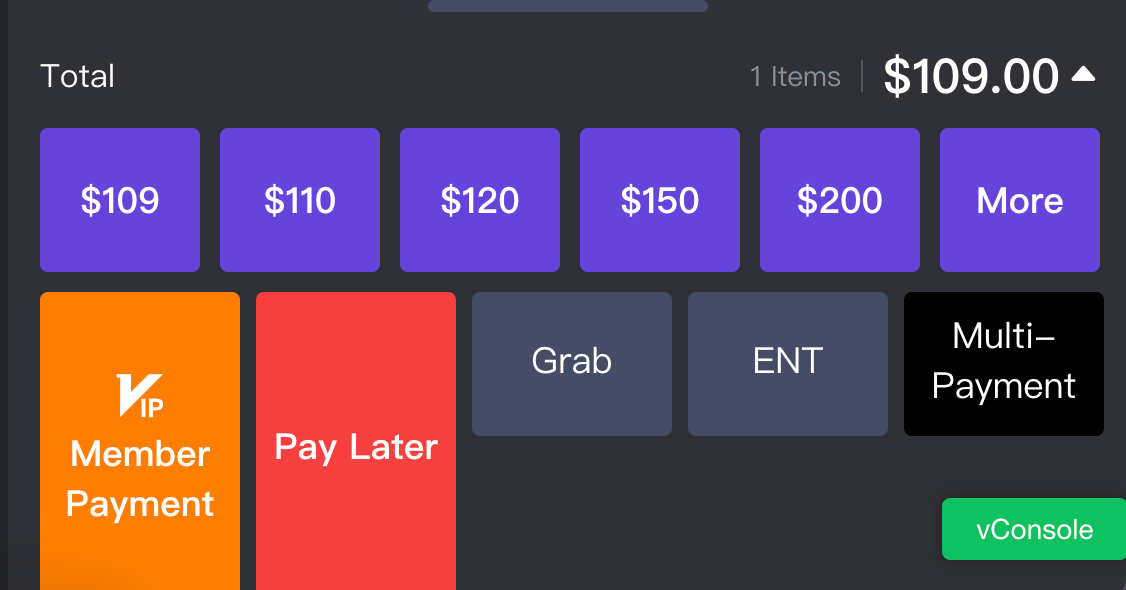 * **Operational Limitations (场景局限性):** This workflow only supports the final state of takeaway. It **cannot be directly converted into a dine-in order**, making it inflexible if a customer suddenly decides to eat in the store. <br> **操作局限性:** 该流程仅支持打包外带的最终形态,**无法直接转为堂食订单**。如果顾客临时改变主意想换成堂食,系统无法直接切换。 #### Module 2: Virtual Table Function Standard SOP 模块二:【虚拟桌台功能】标准操作指南 This function is optimized for remote or advanced pre-ordering scenarios, allowing users to place orders before arrival with flexible fulfillment options. <br> 本功能主打远程或提前预点单场景,适配用户未到店、提前点餐的柔性需求,场景兼容性与灵活性更强。 1. **Create Virtual Table (创建虚拟桌台)**: When a customer pre-orders remotely, create a dedicated "Virtual Table" and add the desired dishes. <br> 1. **创建虚拟桌台**:当顾客远程预点单时,在系统内为其创建一个专属的“虚拟桌台”并录入菜品。 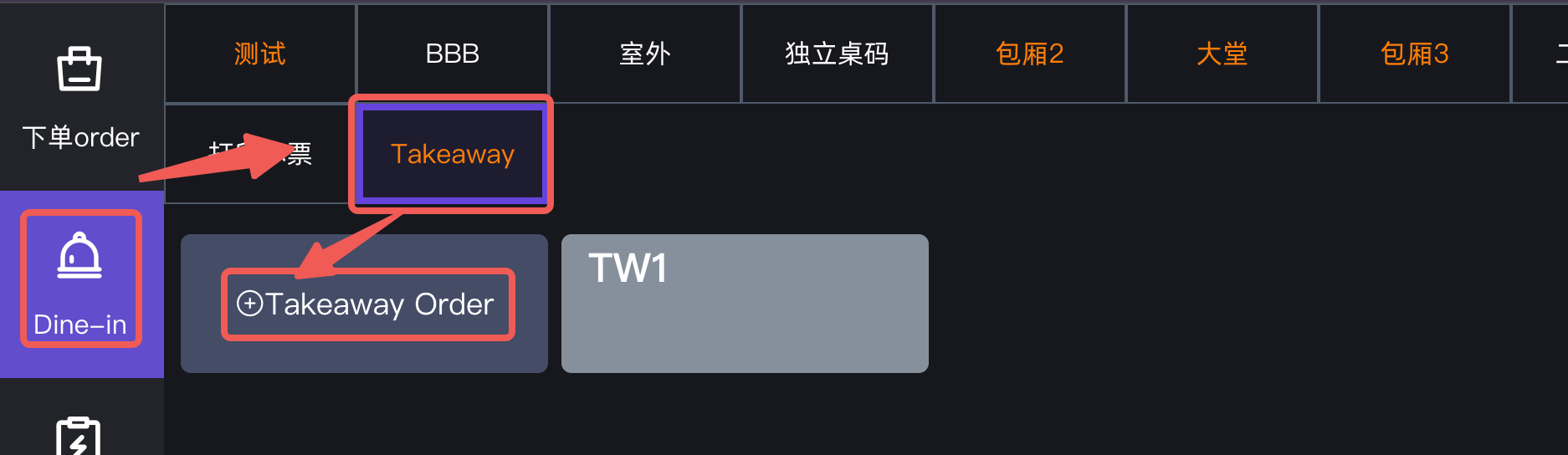 2. **Auto-Save Order (自动暂存订单)**: The order will be **temporarily suspended and auto-saved** by the system. Staff do not need to perform manual hold operations, and immediate payment is not required. <br> 2. **自动暂存订单**:订单提交后会自动**临时挂单并自动暂存**。员工无需执行繁琐的手动挂单,也无需立即要求顾客付款。 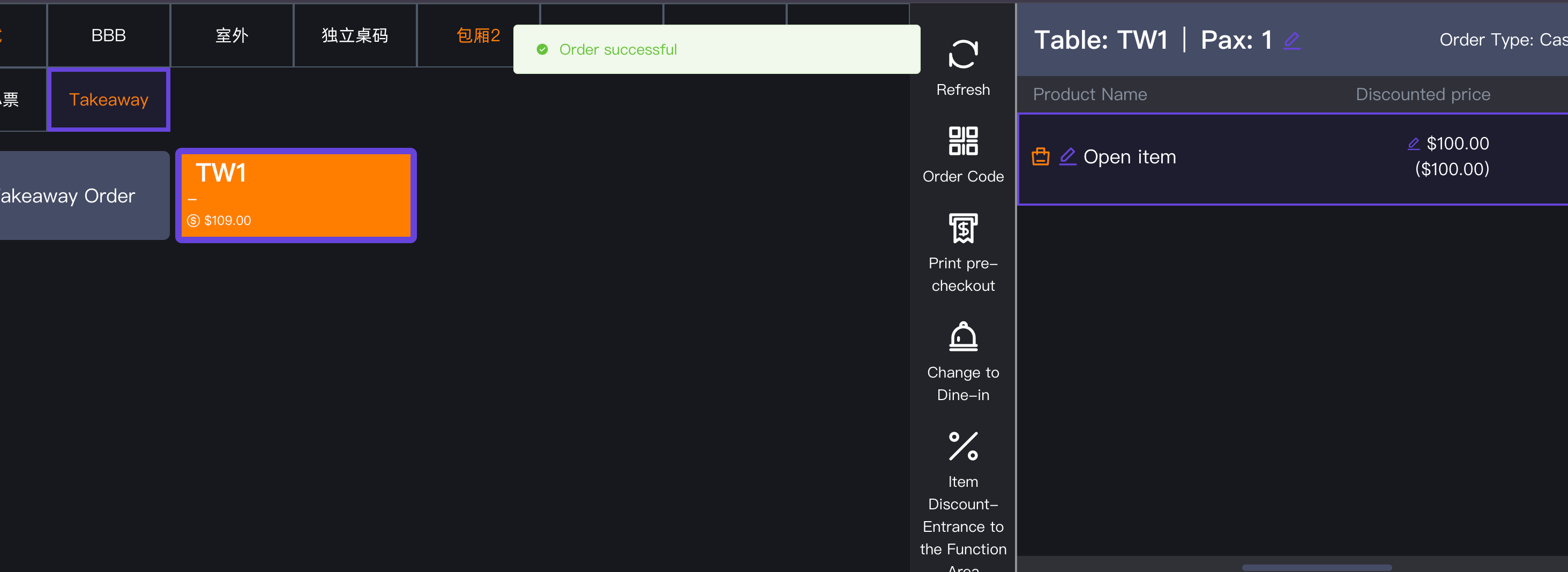 3. **Process Upon Arrival (顾客到店处理)**: When the customer arrives at the store, perform one of the following two actions based on their preference: <br> 3. **顾客到店处理**:顾客到达门店后,根据其最新需求进行以下**二选一操作**: * **Option A: Switch to Packing (转打包)**: If the customer still wants to take the food away, process the payment directly on the virtual table and hand over the meal. <br> **选择 A:转打包**:如果顾客依然要带走,直接在虚拟桌台上操作付款,打包取餐即可。 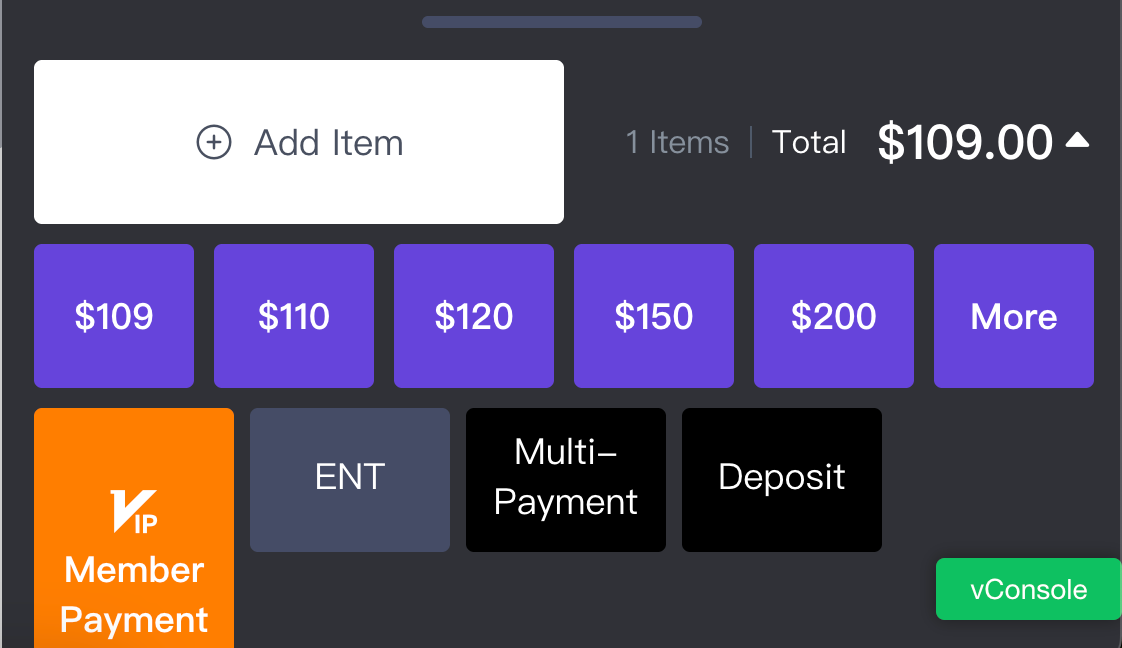 * **Option B: Switch to Dine-In (转堂食)**: If the customer decides to eat inside the restaurant, simply click to **transfer the virtual table order to a physical table**. The order seamlessly converts into a standard dine-in transaction. <br> **选择 B:转堂食**:如果顾客决定在店就餐,只需点击将该虚拟桌台的订单**一键转移至实体桌台**,订单会自动转为标准堂食订单。 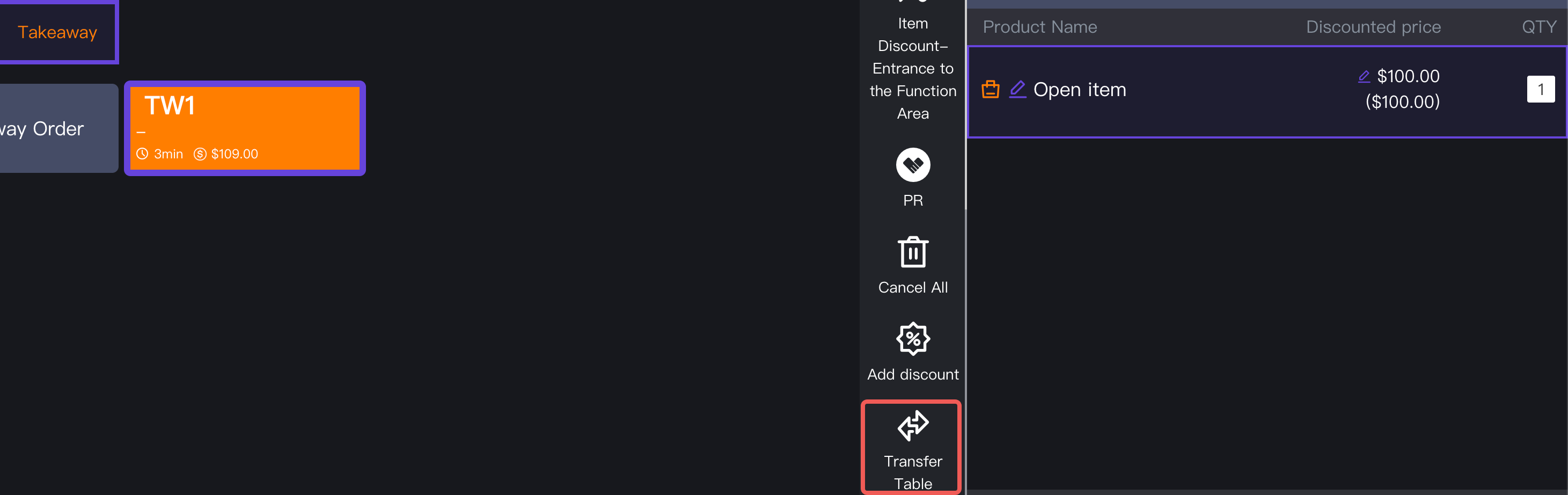 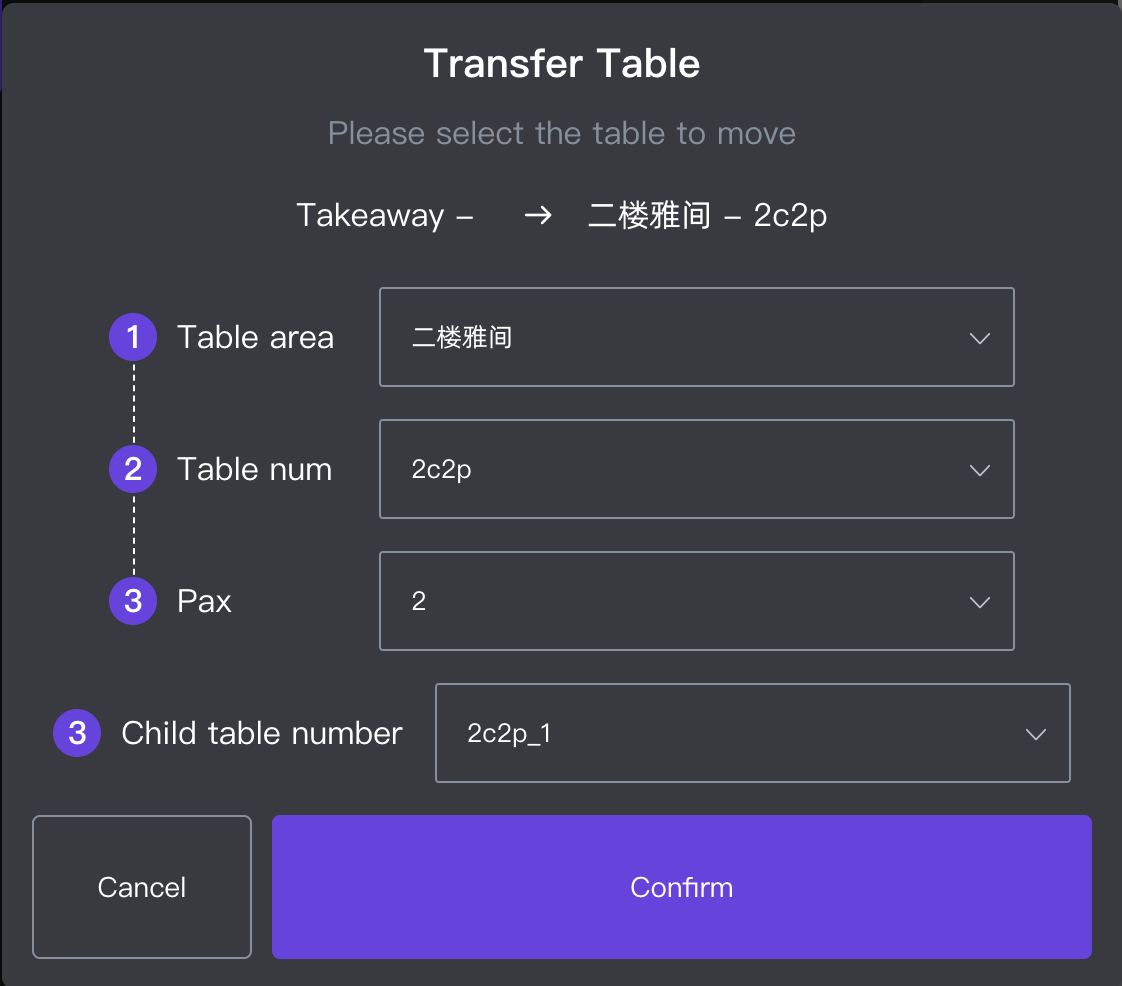 #### Module 3: Business Operation Standards & Selection 模块三:业务操作规范与功能选择 To maximize operational efficiency and improve customer experience, please follow these standardized rules: <br> 为了大幅降低门店操作成本并提升顾客体验,请严格遵循以下门店操作规范: * **Simple Immediate Takeaway ➡️ Use Takeaway Function (简单即时场景 ➡️ 使用打包功能)**: Only use the traditional Takeaway function when the customer is **already inside the store, orders on the spot, and pays immediately**. <br> **简单即时场景 ➡️ 使用【打包功能】**:只有在顾客**已经到店、当场点餐、马上付款**的极速打包高频简单场景下,优先使用传统打包功能。 * **Advanced Pre-ordering Scenarios ➡️ Use Virtual Table Function (复杂预点场景 ➡️ 统一使用虚拟桌台)**: For all scenarios where the customer orders before arriving, defers payment, or is uncertain whether they will dine in or take away, **fully guide the workflow through the Virtual Table Function** to eliminate manual hold-order errors. <br> **复杂预点场景 ➡️ 统一使用【虚拟桌台功能】**:只要是顾客人未到店提前点餐、需要延后付款、或者后续堂食/打包不确定的情况,**统一引导使用虚拟桌台功能**,替代传统的打包挂单模式。 ### 2. Frequently Asked Questions (FAQ) 常见问题 * **Q: Can a Takeaway order with a manual "Hold Order" be transferred to a physical table?** <br> **Q:进行了手动“挂单”的打包订单,可以直接转移到实体桌台上吗?** * **A:** No. Takeaway orders are locked into the takeaway fulfillment path. If a customer decides to dine in instead, staff must cancel or delete the held takeaway order and create a new order directly on a physical table. To avoid this rework, use Virtual Tables for any uncertain pre-orders. <br> **A**:不可以。打包订单被锁定在独立的外带流程中。如果顾客临时反悔想转堂食,店员必须手动取消或删除原有的挂单打包订单,并在实体桌台上重新点单。为了避免这种重复劳动,任何不确定最终去向的预点单请统一使用虚拟桌台。 * **Q: Why is the Virtual Table function preferred for remote pre-ordering over the Takeaway function?** <br> **Q:为什么针对远程预点单,虚拟桌台功能比传统打包功能更好用?** * **A:** The Takeaway function requires staff to exit screens and search through a dense text-based order list to find a held bill, which is prone to errors during peak hours. Virtual Tables offer a highly visual grid layout, allowing staff to manage, modify, or checkout pre-orders with a single click right from the main table view. <br> **A**:因为传统打包功能需要员工跳出当前页面,在密集的纯文本订单列表中去大海捞针般寻找挂单,高峰期极易出错。而虚拟桌台提供了高度可视化的图形网格布局,店员在主桌台视图上一眼就能看清,一键即可完成修改或结账,交互效率极高。 * **Q: If a dine-in order includes takeaway items, how are these items calculated in the sales statistics?** <br> **Q:堂食订单里如果包含了打包的菜品,这些打包菜品在营业数据里怎么统计?** * **A:** Takeaway items included within a dine-in order will be counted under dine-in sales. The system strictly calculates statistics based on the "Order Dimension" (i.e., the primary attribute of the entire order is dine-in). It will not separate individual takeaway items from a dine-in order into the takeaway business category. <br> **A**:堂食订单内包含的打包菜品会统一算在堂食数据内。系统是严格根据“订单维度”(即该订单整体被标记为堂食)来进行数据统计的,不会将堂食订单里的个别打包菜品单独拆分出来计算。
pos
2026年5月19日 10:22
转发文档
收藏文档
上一篇
下一篇
手机扫码
复制链接
手机扫一扫转发分享
复制链接
Markdown文件
PDF文档(打印)
分享
链接
类型
密码
更新密码