财务常见问题
*The Allinpay payment amount and Allinpay backend data are inconsistent. 后台Allinpay支付金额和Allinpay后台数据不一致
Daily Report 日结单
统计商品销售情况
End-to-End Sales Reconciliation SOP 财务对账全流程
Reconciliation Preparation 对账准备
Core Reconciliation Logic 核心对账逻辑
Daily report 日结单
Order Details 订单明细
Q&A 常见问题
The GST calculation formula is Tally GST 计算公式Tally
How is the GTO calculated GTO怎么计算的
How is actual income calculated 实际收入怎么计算
How to Query and Export Refunded Orders 如何查询与导出退款账单明细
-
+
首页
Reconciliation Preparation 对账准备
> This first section of the Financial Reconciliation Manual guides accounting staff on how to accurately export the raw data required for daily reconciliation: individual order records and daily closing reports. It also provides a detailed breakdown of the filtering criteria to ensure accurate data extraction. <br> 本财务对账手册的第一篇旨在指导财务人员如何准确导出对账所需的“原始数据”:订单流水明细与日结汇总单。同时详细解析了各项筛选字段的含义,以确保数据提取的准确性。 #### 1. Export Individual Order Data 导出订单流水明细 Go to **Backend -> Finance -> Reconciliation**. This page allows you to pull granular data for every single transaction. Before exporting, it is crucial to understand the filtering fields to ensure you are downloading the correct dataset for your accounting needs. <br> 前往 **后台 -> 财务 -> 财务对账**。此页面允许您提取每一笔交易的细颗粒度数据。在导出之前,至关重要的是理解各项筛选字段,以确保您下载的是符合财务做账需求的正确数据集。 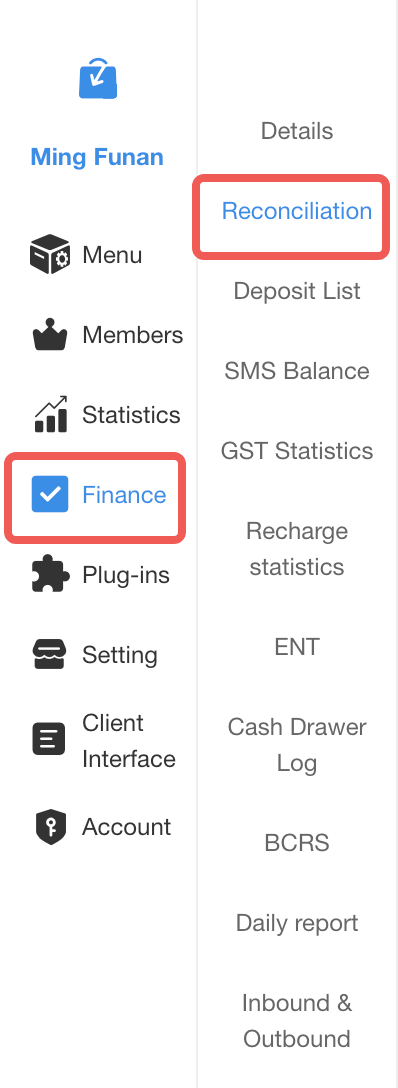 **Key Filtering Fields (核心筛选字段解析):** * **Payment time (支付时间) vs. Order Date (下单日期)**: "Payment time" refers to when the funds were actually collected, while "Order Date" is when the ticket was created. For financial reconciliation and bank matching, you should always filter by **Payment time**. <br> **支付时间 vs 下单日期**:“支付时间”指实际收到款项的时间,而“下单日期”是订单刚创建的时间。为了进行财务对账和银行流水核对,通常必须按**支付时间**进行筛选。 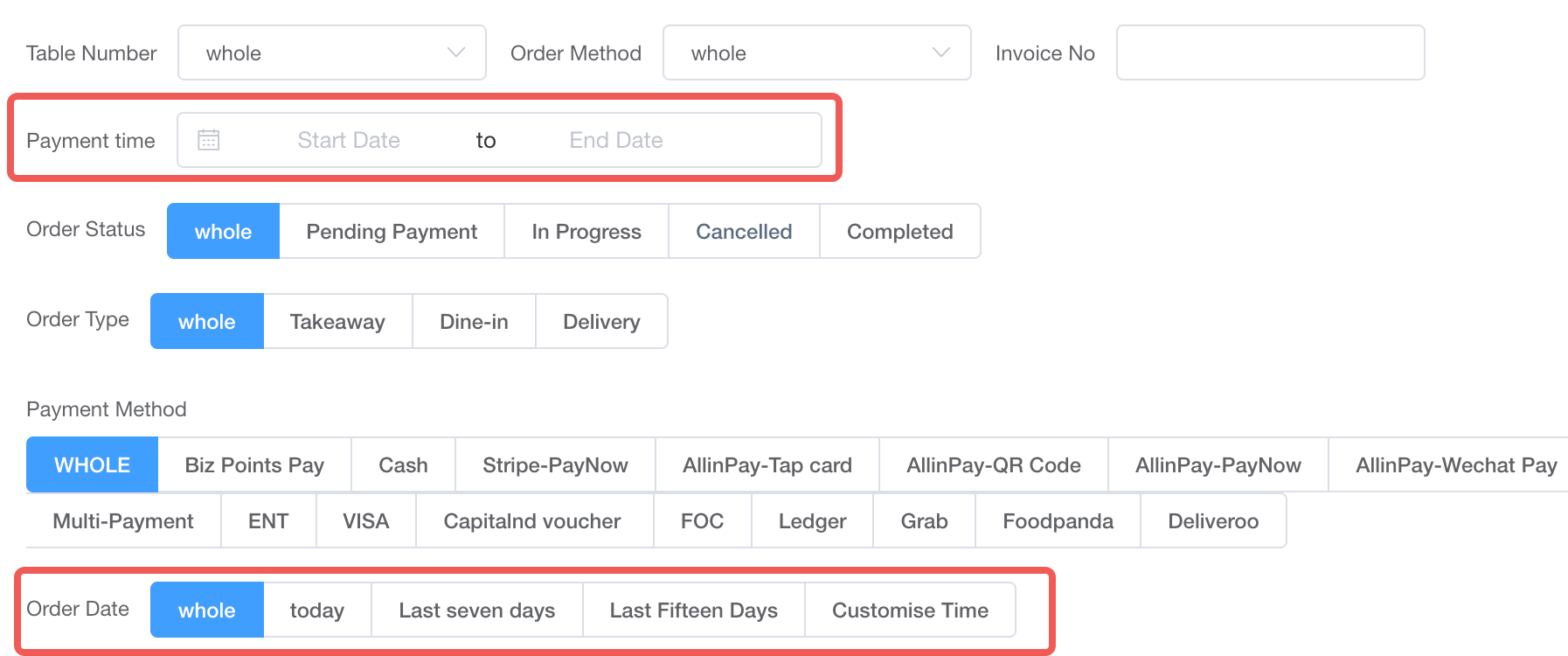 * **Order Status (订单状态)**: To calculate actual realized revenue, you must select **Completed (已完成)**. Including "Pending Payment (待支付)", "In Progress (进行中)", or "Cancelled (已取消)" will inflate your numbers with unpaid or voided transactions. <br> **订单状态**:为了核算实际的真实收入,您必须筛选 **已完成 (Completed)**。如果包含了“待支付”、“进行中”或“已取消”的订单,会导致未付款或已作废的交易虚增您的收入总额。  * **Order Type & Payment Method (订单类型与支付方式)**: These allow you to slice the data (e.g., viewing only Dine-in sales, or only Credit Card payments). For a full day's reconciliation, leave these as "Whole (全部)". <br> **订单类型与支付方式**:允许您切分数据(例如,仅查看堂食销售额,或仅查看信用卡支付)。进行全盘日结对账时,请保持默认的“全部 (Whole)”。  **Export Actions (导出操作):** 1. **Set your exact Payment time range and select "Completed" status.** <br> 1. **设定您精确的支付时间范围,并选择“已完成”状态。** 2. **Download All (导出全部)**: Exports every single order within your filtered range, regardless of the payment method. <br> 2. **导出(全部)**:导出筛选范围内的所有订单,无论使用何种支付方式。 3. **Download without ENT (导出不含ENT)**: Exports all orders *except* those paid via ENT. *(Business Note: "ENT" stands for Entertainment, representing internal staff hospitality or comped meals. Since ENT does not generate actual external cash flow, financial staff usually do not need to include these orders when calculating daily sales. Therefore, this button is the standard choice for revenue reconciliation).* <br> 3. **导出(不含ENT)**:导出除了 ENT(内部招待)支付以外的所有订单。(*业务提示:ENT 代表内部人员招待用餐。由于 ENT 支付不产生实际的外部现金流,财务在对账时一般不需要计算这些订单,因此此按钮是收入对账的标准选择*)。  #### 2.导出当天退款账单 In order to prevent any refund orders spanning multiple days, but considering that the financial information for this order has already been reported, the deduction needs to be made on the refund day and reversed accordingly. Therefore, it is necessary to export the bill for the refund on that day for review.[Operation Procedure](https://wiki.amfuture.ai/doc/295/) 为了以防有跨天退款的订单,但是该订单的财务已经上报的情况,需要抵扣到退款当天进行冲扣,所以需要导出当天退款的账单查看。[操作流程](https://wiki.amfuture.ai/doc/295/) --- #### 2. Export Daily Reports 导出日结汇总单 Go to **Backend -> Finance -> Daily report**. This page provides the macro-level aggregated numbers (the "totals" you will eventually match your individual orders against). <br> 前往 **后台 -> 财务 -> 日结单**。此页面提供宏观的汇总数据(即您最终需要用订单明细去核对的“总数”)。 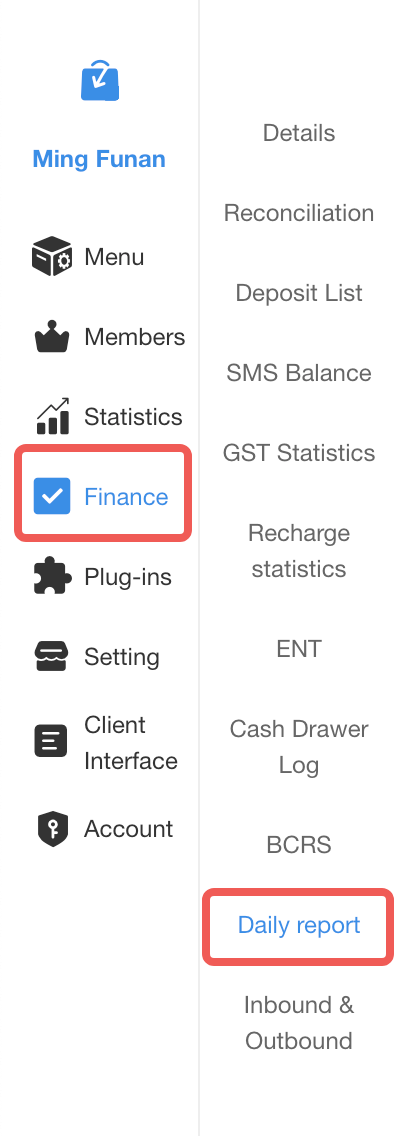 **Key Filtering Fields (核心筛选字段解析):** * **Machine Filter (机器筛选)**: Allows you to view the closing report for a specific POS terminal or Kiosk. To reconcile the entire store's revenue, leave this as "All (全部)". <br> **机器筛选**:允许您查看特定 POS 收银机或自助点餐机的日结单。若要核对全店总收入,请保持默认的“全部 (All)”。 * **Months (月份)**: Select the specific month you wish to review. The system generates aggregated data day by day for the entire month. <br> **月份**:选择您希望查看的特定月份。系统会按天生成整月的汇总数据。  **Export Actions (导出操作):** 1. **Select the target Month and ensure the Machine Filter is set to All.** <br> 1. **选择目标月份,并确保机器筛选设为“全部”。** 2. **Click Export (导出)**: The system will download a comprehensive Excel summary containing the daily totals for that month. <br> 2. **点击 Export (导出)**:系统将下载一份包含该月每天各项汇总数据的 Excel 总表。  --- ### Frequently Asked Questions (FAQ) 常见问题 **Q: Why must I filter by "Payment time" instead of "Order Date" when exporting individual orders?** <br> **Q:为什么在导出订单明细时,我必须按“支付时间”而不是“下单日期”筛选?** **A:** This is crucial for crossing midnight. If a customer places an order at 11:50 PM on May 1st, but pays the bill at 12:10 AM on May 2nd, the bank receives the money on May 2nd. Filtering by "Payment time" ensures your system data perfectly matches your bank statements and the Daily Closing Report logic. <br> **A**:这在处理跨天订单时至关重要。如果顾客在 5 月 1 日晚上 11:50 下单,但在 5 月 2 日凌晨 12:10 才结账付款,银行实际是在 5 月 2 日收到这笔钱的。按“支付时间”筛选能确保您的系统数据与银行流水及日结单的统计逻辑完美吻合。 **Q: I summed up all the orders from the "Download All" Excel file, but the total doesn't match the Daily Closing Report. Why?** <br> **Q:我把“导出全部”的 Excel 文件里的订单全加起来了,但总额和日结单对不上,为什么?** **A:** There are usually two reasons for this. First, you may have forgotten to filter the Order Status to "Completed," accidentally including unpaid or cancelled orders in your sum. Second, "Download All" includes ENT (internal hospitality) orders. The Daily Closing Report's actual revenue usually excludes these non-cash ENT transactions. Please use the "Download without ENT" button for a direct revenue comparison. <br> **A**:通常有两个原因。首先,您可能忘记将“订单状态”筛选为“已完成”,导致未支付或已取消的订单被错误计入总和。其次,“导出全部”包含了 ENT(内部招待)订单。而日结单上的实际收入通常会剔除这些无现金流的 ENT 交易。请使用“导出(不含ENT)”按钮来进行直接的收入核对。
pos
2026年5月7日 14:17
转发文档
收藏文档
上一篇
下一篇
手机扫码
复制链接
手机扫一扫转发分享
复制链接
Markdown文件
PDF文档(打印)
分享
链接
类型
密码
更新密码