财务常见问题
*The Allinpay payment amount and Allinpay backend data are inconsistent. 后台Allinpay支付金额和Allinpay后台数据不一致
Daily Report 日结单
统计商品销售情况
End-to-End Sales Reconciliation SOP 财务对账全流程
Reconciliation Preparation 对账准备
Core Reconciliation Logic 核心对账逻辑
Daily report 日结单
Order Details 订单明细
Q&A 常见问题
The GST calculation formula is Tally GST 计算公式Tally
How is the GTO calculated GTO怎么计算的
How is actual income calculated 实际收入怎么计算
How to Query and Export Refunded Orders 如何查询与导出退款账单明细
-
+
首页
How to Query and Export Refunded Orders 如何查询与导出退款账单明细
> This guide provides step-by-step instructions on how to accurately locate and export orders that have been refunded on a specific day. <br> 本指南将手把手教您如何准确地查出并导出特定日期内发生过退款的所有账单明细。 ### Operation Process 查询与导出流程 #### Step 1: Navigate to the Reconciliation Menu 进入财务对账菜单 Log into your backend system and go to **Backend -> Finance -> Reconciliation**. <br> 登录您的系统后台,前往 **后台 -> 财务 -> 财务对账**。 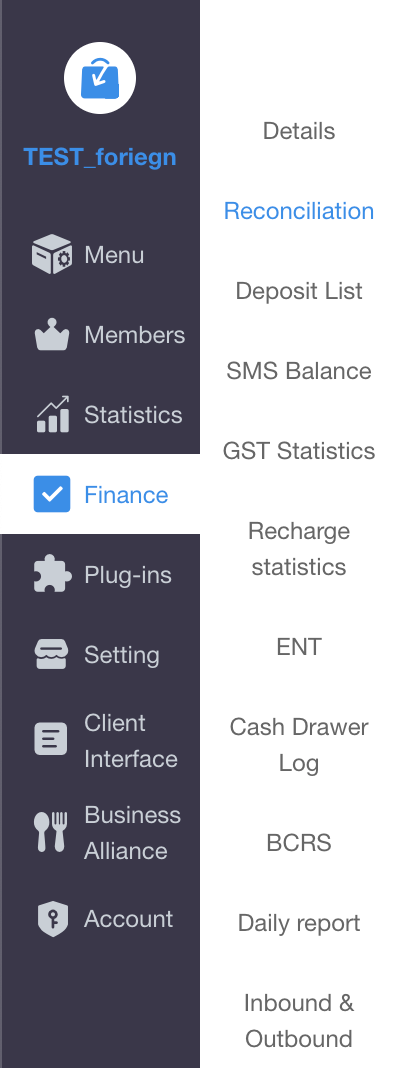 #### Step 2: Filter by "Refund Time" 筛选“退款时间” This is the most crucial step. Do not use the "Payment time" or "Order Date". Instead, locate the **Refund time (退款时间)** filter and select the specific date you want to check (e.g., Today). <br> 这是最关键的一步。请不要使用“支付时间”或“下单日期”,而是直接找到 **退款时间 (Refund time)** 筛选框,选择您需要查询退款的具体日期(例如:今天)。  #### Step 3: Export the Report 导出数据报表 Scroll to the bottom of the page and click the export button (usually **Download without ENT / 导出不含ENT** is recommended for standard revenue checking). <br> 滚动到页面底部,点击导出按钮(日常核算通常推荐点击 **导出不含ENT**)。  #### Step 4: Check the Refund Columns in Excel 在表格中查看退款金额 Open the downloaded Excel file. Scroll to the right to locate the specific refund columns. Here you can see the exact breakdown of the refunded amounts for each order: <br> 打开下载的 Excel 表格,向右滑动找到专属的退款列。在这里您可以清楚地看到每一笔订单退款的详细拆解: * **Refund Money (退款总额)**: The total amount returned to the customer. <br> 实际退还给顾客的总金额。 * **Refund Service money (退款服务费)**: The refunded service charge. <br> 退款中包含的服务费部分。 * **Refund GST (退款税金)**: The refunded tax amount. <br> 退款中包含的税金部分。 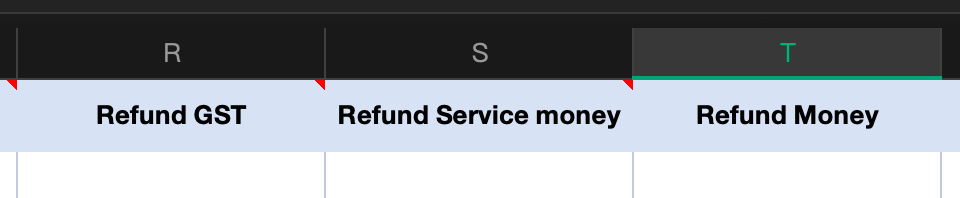 --- ### ⚠️ Important Note: Cross-Day Refunds 跨天退款预警 When you export orders using the "Refund time = Today" filter, the Excel file will show **all orders where the physical refund button was clicked today**. <br> 当您使用“退款时间 = 今天”导出表格时,表格里会显示**今天收银员在机器上按下了退款操作**的所有订单。 However, if a cashier refunds **yesterday's** order today, they must choose where the deduction goes: <br> 但是,如果收银员今天退的是**昨天**的单子,系统会要求他们选择退款账目的归属天数: * If they select **"Original Order Date (下单当天)"**, the refund deduction goes to yesterday's Daily Report. It will **NOT** reduce today's total revenue. <br> 如果选择了 **“下单当天”**:退款金额会去扣减昨天的日结单营业额,**不会**减少今天的总营业额。 * If they select **"Current Refund Date (退款当天)"**, the refund deduction will reduce today's total revenue. <br> 如果选择了 **“退款当天”**:退款金额才会扣减今天的日结单营业额。 **Conclusion (总结):** If the sum of your exported refund list doesn't match the refund total on your Daily Closing Report, it is highly likely due to a cross-day refund being attributed to the "Original Order Date". <br> 如果您导出的退款明细总和与今天日结单上的退款总额对不上,绝大多数情况是因为发生了“跨天退款”,且收银员把账目退回了“下单当天”。
pos
2026年5月7日 14:17
转发文档
收藏文档
上一篇
下一篇
手机扫码
复制链接
手机扫一扫转发分享
复制链接
Markdown文件
PDF文档(打印)
分享
链接
类型
密码
更新密码