财务常见问题
*The Allinpay payment amount and Allinpay backend data are inconsistent. 后台Allinpay支付金额和Allinpay后台数据不一致
Daily Report 日结单
统计商品销售情况
End-to-End Sales Reconciliation SOP 财务对账全流程
Reconciliation Preparation 对账准备
Core Reconciliation Logic 核心对账逻辑
Daily report 日结单
Order Details 订单明细
Q&A 常见问题
The GST calculation formula is Tally GST 计算公式Tally
How is the GTO calculated GTO怎么计算的
How is actual income calculated 实际收入怎么计算
How to Query and Export Refunded Orders 如何查询与导出退款账单明细
-
+
首页
The GST calculation formula is Tally GST 计算公式Tally
**Calculate GST by reverse-engineering the documents exported by the system, used for financial reconciliation. 根据系统导出的文档进行倒算GST,使用于财务对账** ## sketch map 示意图 ## Operation process 操作流程 ### 1.Filter the query conditions 筛选查询条件 Filter under 'Back - > Financial> Financial Reconciliation' to filter the 'Payment Time' 'Order Status' > Complete' criteria 在‘后台-->财务-->财务对账’进行筛选‘支付时间’‘订单状态-->完成’条件 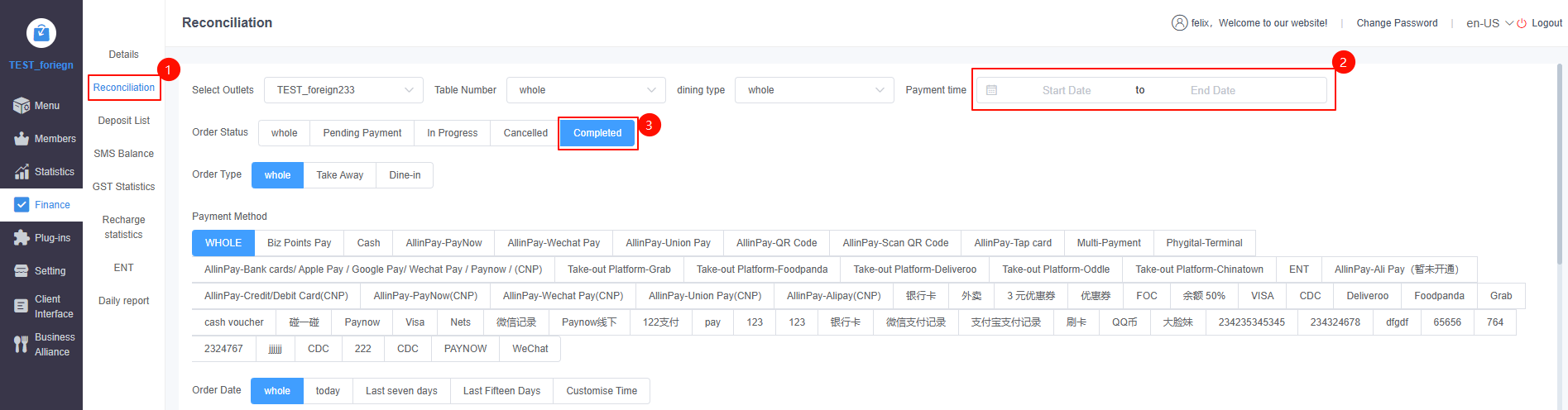 ### 2.Export order details 导出订单详情 Click Export to filter the order details of the data 点击导出,筛选数据的订单详情 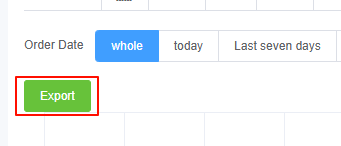 ## Countdown formula 倒算公式 ### 1.The system charges/includes GST, but GST is not charged for consumption points deducted dishes 系统收取/包含GST但消费积分抵扣菜不收取GST **GST = Actual income (G2+M2+O2-J2)/1.09 * 0.09 GST=实际收入(G2+M2+O2-J2)/1.09*0.09** 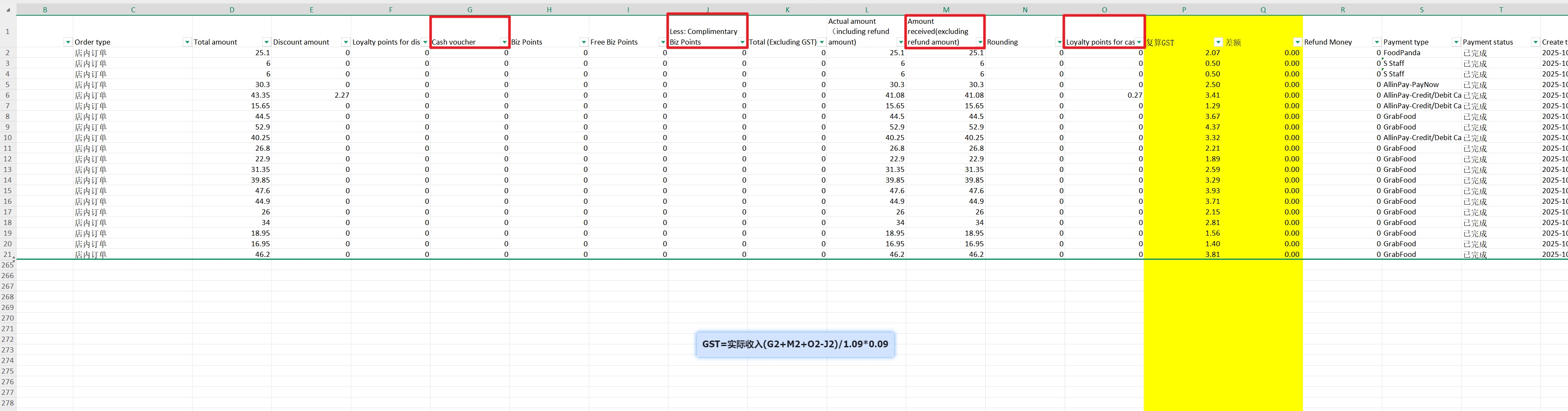 ### Note 注意 M2: Actual income (excluding refund amount) G2: Use the value of the Order Cash Voucher (GST will be charged for the portion paid by the Order Cash Voucher) J2: Gift Business Points (GST is not charged for the included Gift Business Points when paying with Business Points) O2: Consumption points deduction (GST will be charged for part of the deduction at the final payment) M2:实际收入(不含退款金额) G2:使用订单现金券值(订单现金券支付的部分会收取gst) J2:赠送商业积分值(使用商业积分支付时,包含的==赠送商业积分部分不收取gst==) O2:消费积分抵扣钱(在最后支付时,抵扣部分金额,会收取gst) > This section provides a detailed guide on how to reverse-calculate the actual GST using exported individual order documents. This is essential for accurate financial reconciliation, especially when dealing with complex payment methods like points and vouchers. <br> 本节提供了详细的操作指南,教您如何利用导出的单笔订单报表来精准倒算 GST(税金)。在处理积分、代金券等复杂支付方式时,这对于准确的财务对账至关重要。 ### Operation Process 操作流程 #### 1. Filter and Export Order Details 筛选与导出订单明细 1. **Filter Query Conditions (筛选查询条件)**: Go to **Backend -> Finance -> Reconciliation**. Filter your required **Payment Time**, and crucially, set the **Order Status** to **"Completed"**. <br> 1. **筛选查询条件**:前往 **后台 -> 财务 -> 财务对账**。筛选您需要的 **支付时间**,最关键的是将 **订单状态** 筛选为 **“已完成”**。 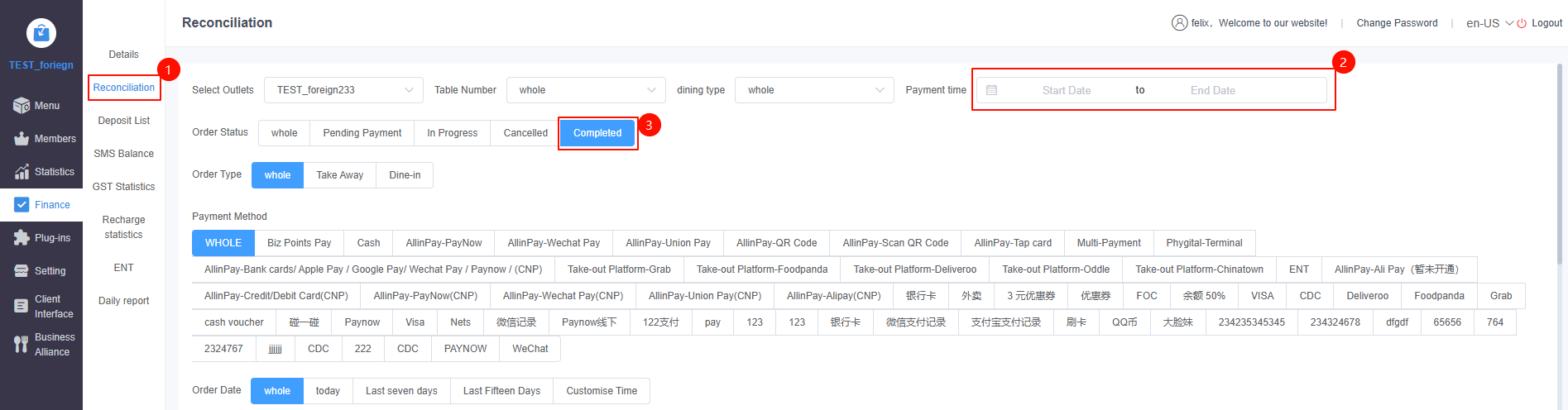 2. **Export (导出)**: Click the export button to download the detailed Excel report for these specific orders. <br> 2. **导出**:点击导出按钮,下载这些订单的详细 Excel 数据明细表。  --- ### GST Calculation Logic GST 核算逻辑 The method for verifying GST depends entirely on your store's tax setting (Exclusive vs. Inclusive). <br> 核实 GST 的方法完全取决于您门店的税务设置(收取/不含税 vs 包含税)。 #### Scenario A: Store EXCLUDES GST (收取 GST 模式) If your store charges GST on top of the menu prices, you do not need to use a reverse-calculation formula. <br> 如果您的门店是在菜单价格之外额外收取 GST,您不需要进行复杂的倒算。 * **Action**: Simply locate the **`GST Amount`** column in your exported Excel file and sum up all the rows. <br> **操作**:直接在导出的 Excel 表格中找到 **`税金 (GST Amount)`** 这一列,将所有行的数据直接求和即可。 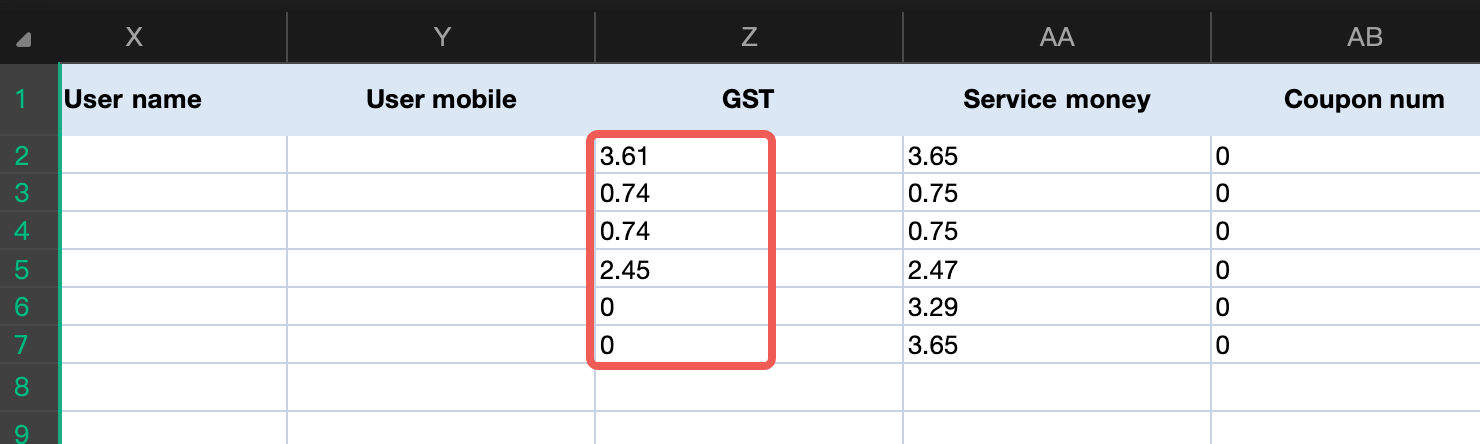 #### Scenario B: Store INCLUDES GST (包含 GST 模式) If your store's prices already include GST, but you do not charge GST on the "bonus/gift" portion of points, you must reverse-calculate it using the formula below based on your Excel columns. <br> 如果您门店的价格已包含 GST,但系统对“赠送的商业积分”部分不收取 GST,您必须根据 Excel 表格中的列,使用以下公式进行倒算。 **Formula (倒算公式 - Assuming 9% GST rate):** `Total GST = (M2 + G2 + O2 - J2) / 1.09 * 0.09` **Excel Variables Explained (公式对应字段解析):** * **`M2` (Actual Income / 实际收入)**: The actual cash flow received (excluding refund amounts). <br> `M2`:实际收入(不含退款金额的实收流水)。 * **`G2` (Order Cash Voucher / 订单现金券)**: GST is still charged for the portion paid by these cash vouchers, so it must be added back. <br> `G2`:使用的订单现金券面值(订单现金券支付的部分等同于现金,会收取 GST,需加回)。 * **`O2` (Loyalty Points Deduction / 消费积分抵扣钱)**: When loyalty points are used to deduct the final payment, GST is charged on this value, so it must be added back. <br> `O2`:消费积分抵扣金额(在最后支付时抵扣的部分,会收取 GST,需加回)。 * **`J2` (Free Biz Points / 赠送商业积分值)**: When customers pay with Business Points, the *bonus/gifted* portion is exempt from GST, so it must be subtracted. <br> `J2`:商业积分赠送值(使用商业积分支付时,包含的**赠送部分**属于商家福利,不收取 GST,需扣除)。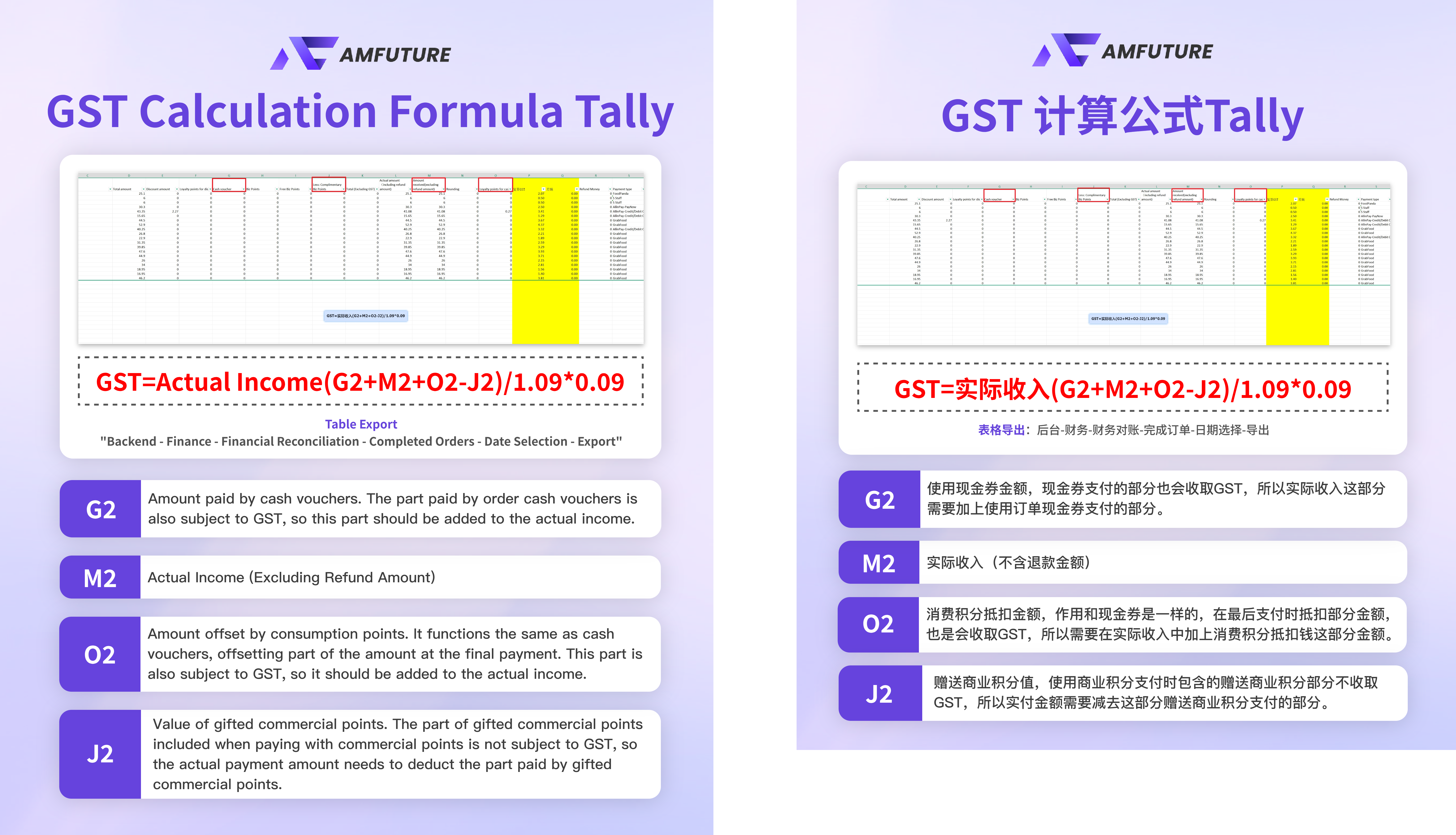 --- ### Frequently Asked Questions (FAQ) 常见问题 * **Q: Why can't I just take the "Total Daily Revenue" from the Daily Closing Report and apply the formula `Total / 1.09 * 0.09` to get my GST? Why must I sum up individual orders?** <br> **Q:为什么我不能直接拿日结单上的“全天实际收款总额”,直接统一算一次 `总额 / 1.09 * 0.09` 来得出 GST?为什么非要从每笔订单倒算然后再相加?** * **A:** This is due to **per-order rounding differences (四舍五入尾差)**. At the POS, GST is calculated and rounded to the nearest cent *for each individual order* at the time of checkout. If you sum all the daily revenue first into one massive number and then apply the GST formula, the math completely ignores those micro-rounding differences from hundreds of orders. This will lead to a variance between your manual calculation and the system's actual collected GST. **The larger the order volume or transaction amounts, the bigger this deviation will become.** Always calculate/sum based on the individual order level to ensure perfect accuracy. <br> **A**:这是因为**单笔订单的四舍五入尾差**造成的。在收银台结账时,系统是针对**每一笔独立订单**进行 GST 计算并进行四舍五入的。如果您先将全天所有收入加总成一个庞大的数字,再去统一乘除税率公式,这种算法完全忽略了成百上千笔订单在结账时产生的微小尾差。这会导致您的手工计算结果与系统实际收取的 GST 产生偏差,并且**当天的订单量越大、金额越高,这种计算偏差就会被放得越大**。为了保证对账绝对精准,请务必基于单笔订单的明细来求和与倒算。
pos
2026年5月6日 18:03
转发文档
收藏文档
上一篇
下一篇
手机扫码
复制链接
手机扫一扫转发分享
复制链接
Markdown文件
PDF文档(打印)
分享
链接
类型
密码
更新密码