后台
1.Menu 商品
1.1 Add Product 添加商品
1.1.1 Product image management 商品图片管理
1.1.2 Main dish as set meal name? 商品名是否进厨房
1.1.3 Members Discount Setting 会员折扣管理
1.2 Batch lmport 批量导入商品
1.3 How to batch operate goods 如何批量操作商品
1.4 sort management 分类管理
1.5 Customized package at the cash register 收银台自定义套餐
1.6 库存管理
1.6.1 快速操作商品库存
1.6.2 如何操作入库
1.6.3 如何操作损耗
1.6.4如何盘点库存
1.6.5 如何查看操作记录
1.7 Purchase Management 采购管理
1.7.1 Supplier Category 供应商管理
1.7.3 Status Setting 状态分类
1.7.4 Add Purchase Order 新增采购单
1.7.4 Edit Purchase Order Status 编辑采购单状态
1.7.5 Check the purchase order 查看采购订单详情
2.Members 会员
2.1 Member management 会员管理
2.1.1 快速查找会员
2.1.2 编辑用户信息
2.1.3 商业积分/消费积分修改
2.1.4 会员详情
2.2 Level management 等级管理
2.2.1全局设置
2.2.2新增等级
2..2.3设置等级福利
2.3消费积分管理
2.3.1 Adjusted points Settings 消费积分设置
2.3.2 消费积分获取和抵扣
2.3.3 Points validity perio 积分有效期
2.4 商业积分明细
2.4.1 充值设置
2.4.2 充值套餐
3. Statistics 统计
3.2 Members 会员统计
3.1 Sales 销售统计
4. Finance 财务
4.1 Details 资产总览
4.2 Deposit List 押金列表
4.3 SMS Balance 短信余额
4.4.1 SMS recharge 短信充值
4.4.2 Usage Record 使用记录
4.4.3 Topup Record 充值记录
4.4 GST Statistics GST统计
4.5 Recharge statistics 充值统计
4.6 ENT
4.6.1 Transaction Details 交易明细
4.6.2 Personnel Details 人员明细
4.7 钱箱日志
4.8 出入库
4.8.1 Stock Out Statistics
4.8.2 Stock In Statistics 入库统计
5.Plug-ins 插件
Cashier Desk 收银台
1. Cashier 收银员
2. Basic settings 基础设置
3. Function Setting 功能设置
4. POS Cashier POS收银端
KIOSK 自助点餐机
Settings 设置
graphics List 广告图列表
Android System 安卓系统
Delivery Service 外卖配送
Product maps 商品映射
Promotion Voucher Personalized Link 专属优惠券链接
Selling vouchers on TikTok TikTok卖券
Receive Promotion Voucher 领取优惠券
TikTok food reviewer TikTok 探店达人
如何配置AI老客户召回
1. 选择发送方式
2. 怎么配置后台参数
3.常见问题
AI加购推荐
1.人工推荐设置
2.智能推荐设置
3.加购设置
4.常见问题
PR Marketing/PR Guest-Bringing 营销/公关带客
PR settings PR设置
cashier desk open PR 收银台开启PR入口
View customer data 查看带客数据
Coupon not available time 优惠券不可用时间
Sync the coupon unusable time 同步优惠券不可使用时间
Double points configuration 翻倍积分
Account/权限
Role management 角色管理
Administrator 管理员列表
Amfuture integrates with Xero Amfuture对接Xero
How to Authorize Xero 如何授权Xero
How to declare GST 如何申报GST
Frequently Asked Questions (FAQ) 常见问题
常见问题
Create an Open item 制作Open item
Change the product picture 更换商品图片
Kds调整成先吃后付
Adjust the language of the receipt 调整小票语言
Product additive configuration 商品加料配置
1.Basic setting 基础设置
2.Frequently asked questions常见问题
3.Common cases 常见案例
4. The product is simultaneously added with other ingredients 商品同步成其他加料
Apply change to selection 批量同步商品加料
Deliver model 外卖模式
Manual Entry of Delivery Orders 手动输入外卖订单
Grab Delivery System Integration Grab 平台系统对接
Delivery Service 商家自配送外卖
Amfuture MCP 对接与 Skills 安装指南(对话式 · 一键复制版)
1. 登录与首页
-
+
首页
Delivery Service 外卖配送
> This section allows merchants to configure the core business rules for their in-house delivery service (typically accessed by customers via Takeaway QR codes). <br> 本节允许商户配置其自营外卖配送服务(通常由顾客通过打包扫码点餐访问)的核心业务规则。 > > It controls everything from delivery destinations and minimum order thresholds to customer time slot selections and automated kitchen dispatch timing. <br> 它控制从配送目的地和起送门槛,到顾客时段选择以及后厨自动派单时间的各个方面。 #### Delivery & Billing 配送与计费 * **POS Location (POS 位置)**: The checkout and delivery information screen on the customer's mobile ordering interface. <br> 顾客手机点餐界面上的结账与配送信息屏幕。 * **POS Effect (前端效果)**: Dictates the valid delivery destination and the financial threshold required for a customer to successfully submit an order. <br> 决定有效的配送目的地,以及顾客成功提交订单所需的金额门槛。 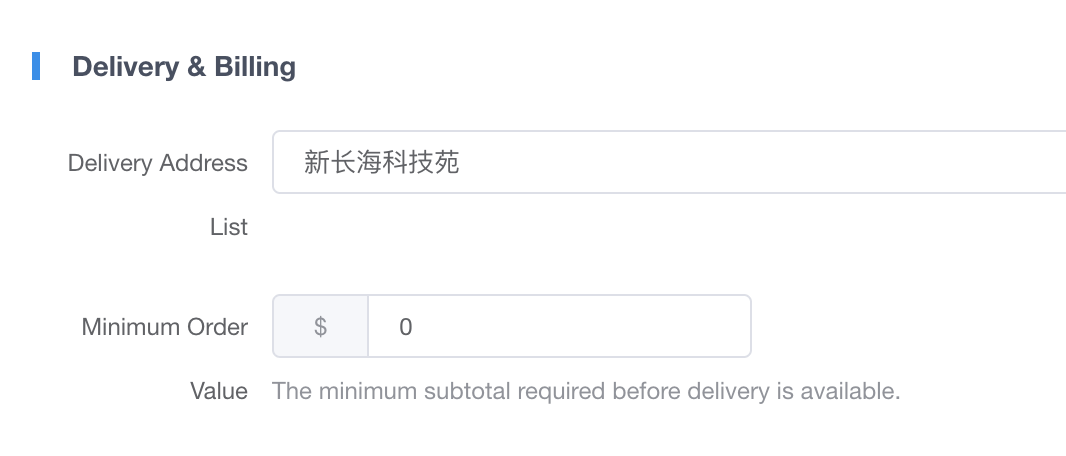 * **Delivery Address List / 配送地址列表** * **Description (配置含义)**: Defines the allowed delivery location. <br> 定义允许的配送地点。 * **Effect (具体表现)**: Currently, the system supports configuring **only one fixed delivery address** (e.g., a specific office building or tech park). Customers placing a delivery order will only have their items delivered to this single designated location. <br> 目前,系统仅支持配置**一个固定的配送地址**(例如特定的办公楼或科技园区)。下外卖订单的顾客,其餐品将只被配送至此唯一指定的地点。 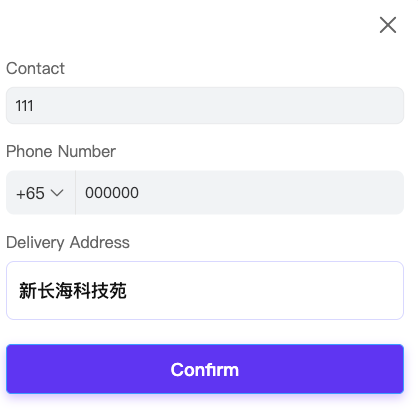 * **Minimum Order / 起送门槛** * **Description (配置含义)**: The minimum subtotal required before delivery is available. <br> 提供配送服务前商品必须达到的最低结算金额。 * **Effect (具体表现)**: If the total value of the items in the customer's cart is lower than this configured amount (e.g., $10), the checkout button will be disabled or prompt an error, intercepting the order submission. <br> 如果顾客购物车内的商品总价低于此设定的金额(如 $10),结账按钮将被禁用或提示错误,从而拦截订单提交。 #### Operating Hours 营业与时间 * **POS Location (POS 位置)**: The "Expected Delivery Time" dropdown selection menu on the customer's mobile UI. <br> 顾客手机界面上的“期望送达时间”下拉选择菜单。 * **POS Effect (前端效果)**: Populates the exact time slots available for customers to choose from and dynamically hides slots when the cut-off time passes. <br> 填充顾客可供选择的具体时间段,并在超过截单时间后动态隐藏这些时段。 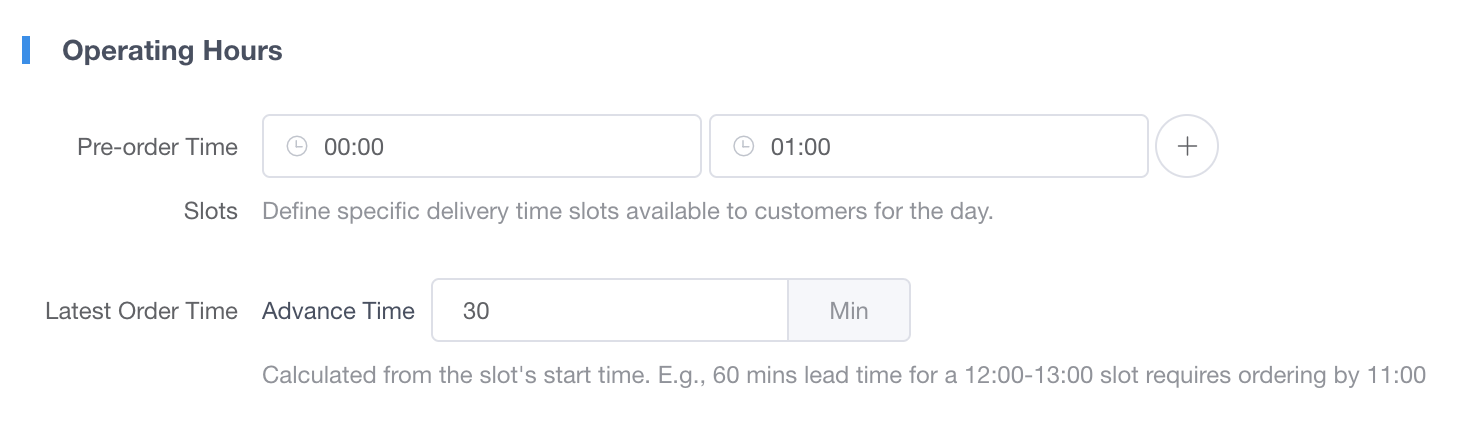 * **Pre-order Time Slots / 可预约时段** * **Description (配置含义)**: Specific delivery time windows defined by the merchant. <br> 由商户定义的具体配送时间窗口。 * **Effect (具体表现)**: Each time slot added here (e.g., 12:00-12:30) will directly appear as a selectable option in the customer's mobile ordering interface. <br> 在此处添加的每一个时间段(如 12:00-12:30),都会直接作为可选项出现在顾客的手机点餐界面中。 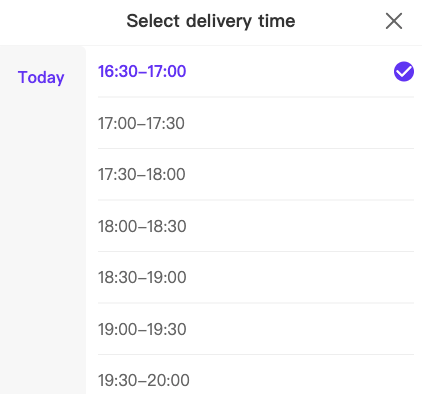 * **Latest Order Time / 最晚下单时间(提前截单)** * **Description (配置含义)**: The advance cut-off time required for any given slot. <br> 任何特定时段所需的提前截单时间。 * **Effect (具体表现)**: Calculated backward from the slot's start time. For example, if set to 30 minutes, a customer must order before 11:30 for a 12:00-12:30 slot. Once the clock hits 11:30, that specific time slot will **completely disappear** from the customer's selection menu to prevent late orders. <br> 从该时段的起始时间向前推算。例如,若设为提前 30 分钟,顾客若想选 12:00-12:30 的时段,必须在 11:30 前下单。一旦时间过了 11:30,该特定时间段将从顾客的选择菜单中**彻底消失**,以防止延迟下单。 #### Kitchen Operations 后厨出餐 * **POS Location (POS 位置)**: The Kitchen Display System (KDS) and physical receipt printers in the kitchen. <br> 后厨的厨房显示系统(KDS)和物理小票打印机。 * **POS Effect (前端效果)**: Manages the automated delay logic for dispatching tickets, ensuring food is prepared fresh and not sitting cold. <br> 管理下发小票的自动延迟逻辑,确保食物新鲜出炉而不会变冷。  * **Kitchen Prep Time / 厨房备餐时间** * **Description (配置含义)**: The required lead time for chefs to prepare the order. <br> 厨师备餐所需的提前量时间。 * **Effect (具体表现)**: The system acts smartly: it will not print the ticket immediately when a customer places a scheduled order. Instead, it prints based on this setting. If set to 20 minutes advance time, a scheduled delivery order for the 12:00-13:00 slot will automatically drop to the kitchen printers and KDS at exactly 11:40. <br> 系统会智能运作:当顾客下达预订单时,系统不会立刻打票。相反,它会根据此设置出单。若设定提前 20 分钟备餐,那么 12:00-13:00 时段的外卖预订单,将会在 11:40 准时自动下发至厨房打印机和 KDS。 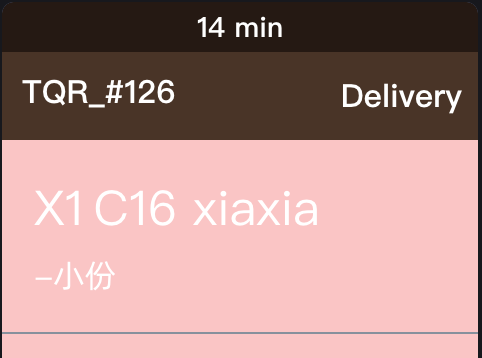 --- ### 2. Frequently Asked Questions (FAQ) 常见问题 * **Q: Why are there no selectable delivery time slots showing up on the customer's mobile ordering page?** <br> **Q:为什么顾客的手机端点餐界面上,没有可以选择的配送时间段?** 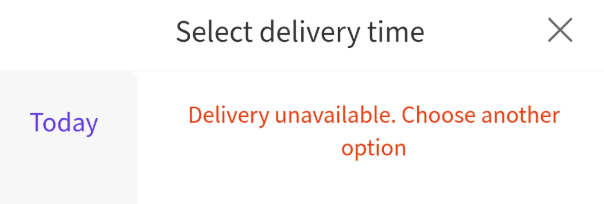 * **A:** Please check two specific settings. First, verify the **Pre-order Time Slots**. A common mistake is entering a single broad operating range (e.g., 8:00 AM to 8:00 PM); you must actively create and add the specific intervals (e.g., 12:00-12:30, 12:30-13:00) you want to offer. Second, if the slots are configured correctly, check your **Latest Order Time**. If the current time has already passed the configured cut-off time, those slots will dynamically disappear from the mobile interface to prevent late orders. <br> **A**:请检查两项具体设置。首先,核对**可预约时段**。一个常见的误区是商户只填写了一个营业大范围(比如从早 8 点到晚 8 点),您必须主动创建并添加您想提供的具体细分时段(如 12:00-12:30,12:30-13:00)。其次,如果时段配置没问题,请检查您的**最晚下单时间**。如果当前时间已经超过了设定的提前截单时间,这些时段就会在手机端自动消失(即已不再允许配送的范围内),以防止延迟下单。 * **Q: A customer placed a delivery order for 6:00 PM at 2:00 PM, but the kitchen didn't get a ticket. Is the printer broken?** <br> **Q:顾客在下午 2:00 下了一个晚上 6:00 的外卖预订单,但厨房没有收到小票。是打印机坏了吗?** * **A:** No, this is normal. To ensure food quality, the ticket is held in the cloud. It will automatically drop to the kitchen based on your "Kitchen Prep Time" setting just before the scheduled delivery time (e.g., at 5:40 PM if set to 20 mins). <br> **A**:不,这是正常现象。为了确保食品质量,该小票被暂存在云端。它将根据您的“厨房备餐时间”设置,在预计送达时间前自动下发到厨房(例如,若设置了 20 分钟,则会在下午 5:40 出单)。
pos
2026年4月21日 16:20
转发文档
收藏文档
上一篇
下一篇
手机扫码
复制链接
手机扫一扫转发分享
复制链接
Markdown文件
PDF文档(打印)
分享
链接
类型
密码
更新密码