后台
1.Menu 商品
1.1 Add Product 添加商品
1.1.1 Product image management 商品图片管理
1.1.2 Main dish as set meal name? 商品名是否进厨房
1.1.3 Members Discount Setting 会员折扣管理
1.2 Batch lmport 批量导入商品
1.3 How to batch operate goods 如何批量操作商品
1.4 sort management 分类管理
1.5 Customized package at the cash register 收银台自定义套餐
1.6 库存管理
1.6.1 快速操作商品库存
1.6.2 如何操作入库
1.6.3 如何操作损耗
1.6.4如何盘点库存
1.6.5 如何查看操作记录
1.7 Purchase Management 采购管理
1.7.1 Supplier Category 供应商管理
1.7.3 Status Setting 状态分类
1.7.4 Add Purchase Order 新增采购单
1.7.4 Edit Purchase Order Status 编辑采购单状态
1.7.5 Check the purchase order 查看采购订单详情
2.Members 会员
2.1 Member management 会员管理
2.1.1 快速查找会员
2.1.2 编辑用户信息
2.1.3 商业积分/消费积分修改
2.1.4 会员详情
2.2 Level management 等级管理
2.2.1全局设置
2.2.2新增等级
2..2.3设置等级福利
2.3消费积分管理
2.3.1 Adjusted points Settings 消费积分设置
2.3.2 消费积分获取和抵扣
2.3.3 Points validity perio 积分有效期
2.4 商业积分明细
2.4.1 充值设置
2.4.2 充值套餐
3. Statistics 统计
3.2 Members 会员统计
3.1 Sales 销售统计
4. Finance 财务
4.1 Details 资产总览
4.2 Deposit List 押金列表
4.3 SMS Balance 短信余额
4.4.1 SMS recharge 短信充值
4.4.2 Usage Record 使用记录
4.4.3 Topup Record 充值记录
4.4 GST Statistics GST统计
4.5 Recharge statistics 充值统计
4.6 ENT
4.6.1 Transaction Details 交易明细
4.6.2 Personnel Details 人员明细
4.7 钱箱日志
4.8 出入库
4.8.1 Stock Out Statistics
4.8.2 Stock In Statistics 入库统计
5.Plug-ins 插件
Cashier Desk 收银台
1. Cashier 收银员
2. Basic settings 基础设置
3. Function Setting 功能设置
4. POS Cashier POS收银端
KIOSK 自助点餐机
Settings 设置
graphics List 广告图列表
Android System 安卓系统
Delivery Service 外卖配送
Product maps 商品映射
Promotion Voucher Personalized Link 专属优惠券链接
Selling vouchers on TikTok TikTok卖券
Receive Promotion Voucher 领取优惠券
TikTok food reviewer TikTok 探店达人
如何配置AI老客户召回
1. 选择发送方式
2. 怎么配置后台参数
3.常见问题
AI加购推荐
1.人工推荐设置
2.智能推荐设置
3.加购设置
4.常见问题
PR Marketing/PR Guest-Bringing 营销/公关带客
PR settings PR设置
cashier desk open PR 收银台开启PR入口
View customer data 查看带客数据
Coupon not available time 优惠券不可用时间
Sync the coupon unusable time 同步优惠券不可使用时间
Double points configuration 翻倍积分
Account/权限
Role management 角色管理
Administrator 管理员列表
Amfuture integrates with Xero Amfuture对接Xero
How to Authorize Xero 如何授权Xero
How to declare GST 如何申报GST
Frequently Asked Questions (FAQ) 常见问题
常见问题
Create an Open item 制作Open item
Change the product picture 更换商品图片
Kds调整成先吃后付
Adjust the language of the receipt 调整小票语言
Product additive configuration 商品加料配置
1.Basic setting 基础设置
2.Frequently asked questions常见问题
3.Common cases 常见案例
4. The product is simultaneously added with other ingredients 商品同步成其他加料
Apply change to selection 批量同步商品加料
Deliver model 外卖模式
Manual Entry of Delivery Orders 手动输入外卖订单
Grab Delivery System Integration Grab 平台系统对接
Delivery Service 商家自配送外卖
Amfuture MCP 对接与 Skills 安装指南(对话式 · 一键复制版)
1. 登录与首页
-
+
首页
2. Basic settings 基础设置
> This tab allows merchants to configure fundamental UI display options, security verification steps, and operational workflows for the POS cashier terminal. <br> 本标签页允许商户配置 POS 收银终端的基础 UI 展示选项、安全验证步骤以及操作工作流。 #### Access Path & Basic Settings 访问路径与基础设置 * **Access Path / 访问路径** * **Description (配置含义)**: The direct web URL to access the POS Cashier system. <br> 用于访问 POS 收银系统的直接网页链接。 * **POS Effect (前端效果)**: Clicking the "Access" (访问) button next to the link will directly open the POS cashier interface in a new browser tab, allowing the merchant to immediately start operating the till. <br> 点击链接旁的“访问”按钮,将在新的浏览器标签页中直接打开 POS 收银界面,允许商户立即开始收银操作。 * **Display All Categories / 是否展示全部分类** * **Description (配置含义)**: Controls whether a master "All" category is shown on the menu. <br> 控制菜单上是否显示总的“全部”分类。 * **POS Effect (前端效果)**: If 'Yes', the POS ordering screen will feature a master tab showing every available item across all categories, allowing cashiers to scroll through the entire menu continuously without needing to tap into individual category tabs. <br> 如果选“是”,POS 点餐屏幕将显示一个主标签页,展示所有分类下的可用菜品,允许收银员连续滑动浏览整个菜单,而无需点击进入单独的分类标签。 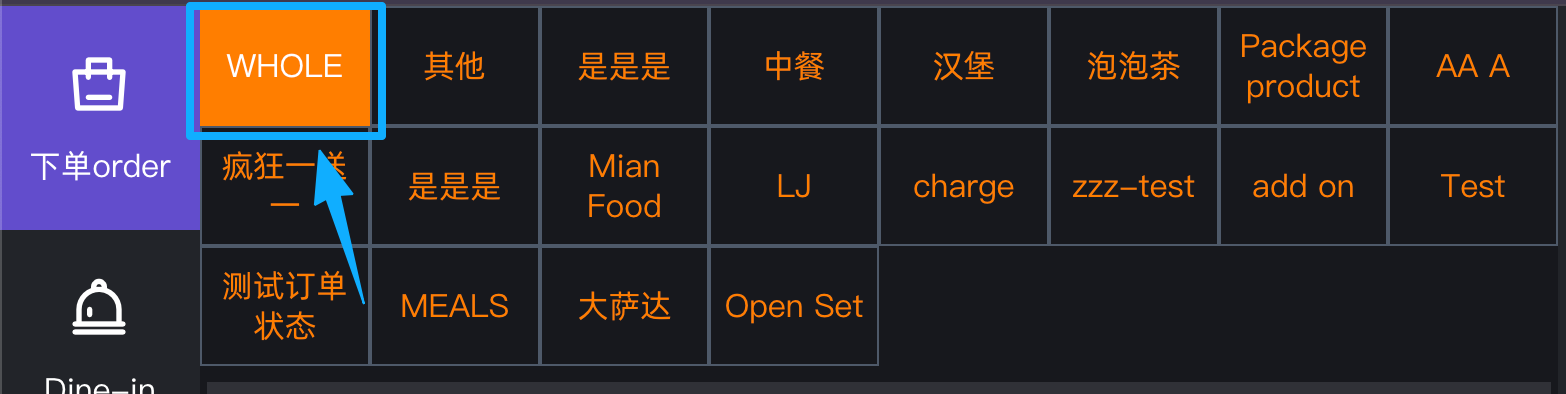 * **Display Product Picture / 是否展示图片** * **Description (配置含义)**: Toggles product thumbnails on the ordering screen. <br> 切换点餐屏幕上的产品缩略图显示。 * **POS Effect (前端效果)**: If 'Yes', product images will be displayed on the POS menu. If 'No', the interface switches to a text-only list mode, which can save screen space and speed up ordering for experienced cashiers. <br> 如果选“是”,POS 菜单上将显示产品图片。如果选“否”,界面将切换为纯文本列表模式,这可以节省屏幕空间并加快熟练收银员的点餐速度。 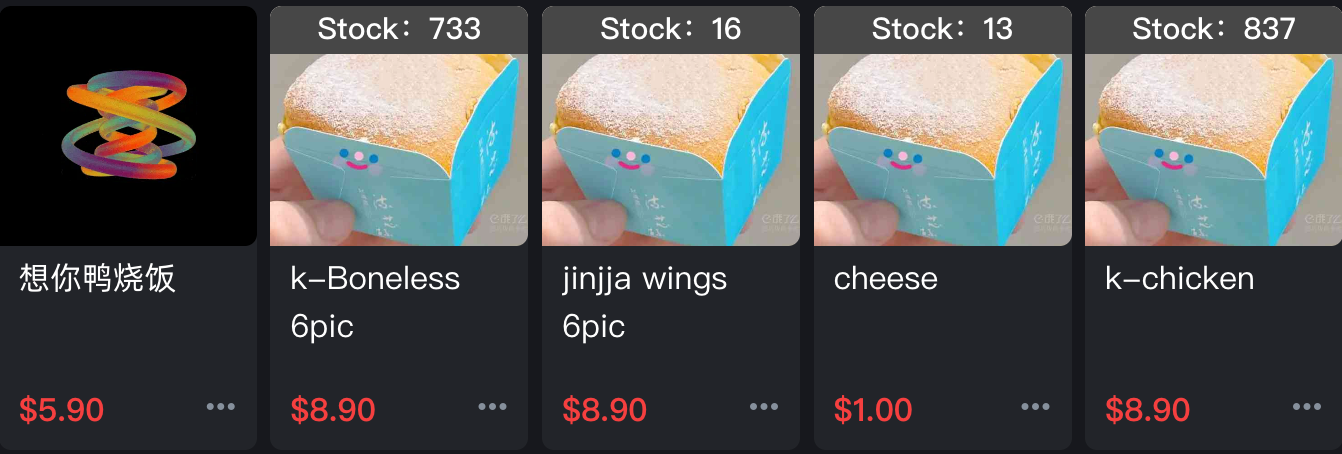 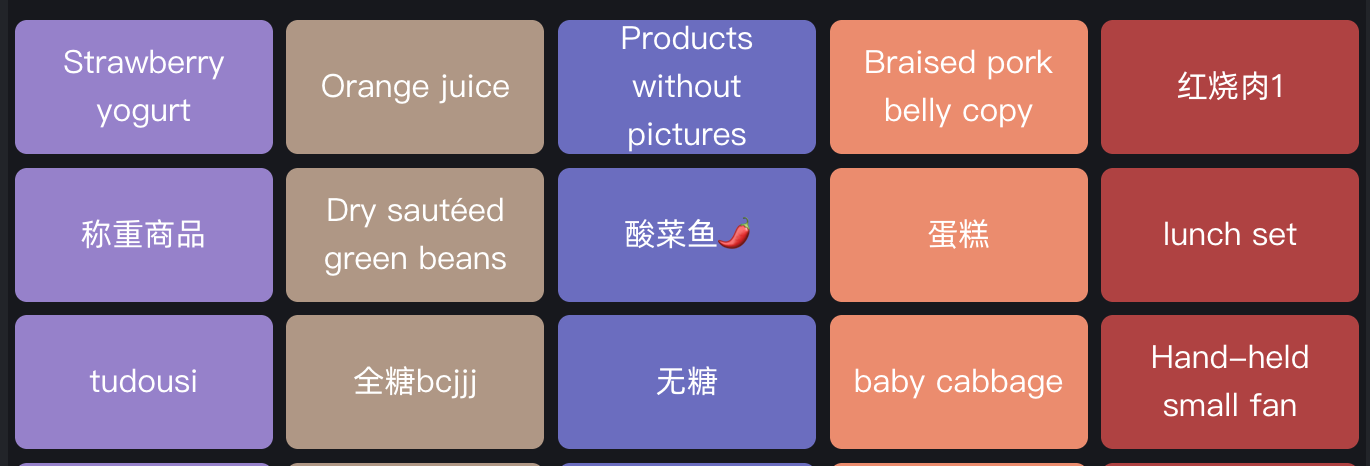 * **Turn on the takeaway table or not / 是否开启takeaway桌台** * **Description (配置含义)**: Controls the availability of a dedicated ordering mode for takeaways. <br> 控制是否提供专用的外带点餐模式。 * **POS Effect (前端效果)**:If "Yes" is selected, cashier may place Takeaway orders under Dine-In on the POS. This is commonly used for handling multiple takeaway orders simultaneously (hold orders). <br> 如果选“是”,POS 上将在堂食中可以下单“外带 (Takeaway)”,常用于外带订单需要同时处理很多单的情况(挂单) 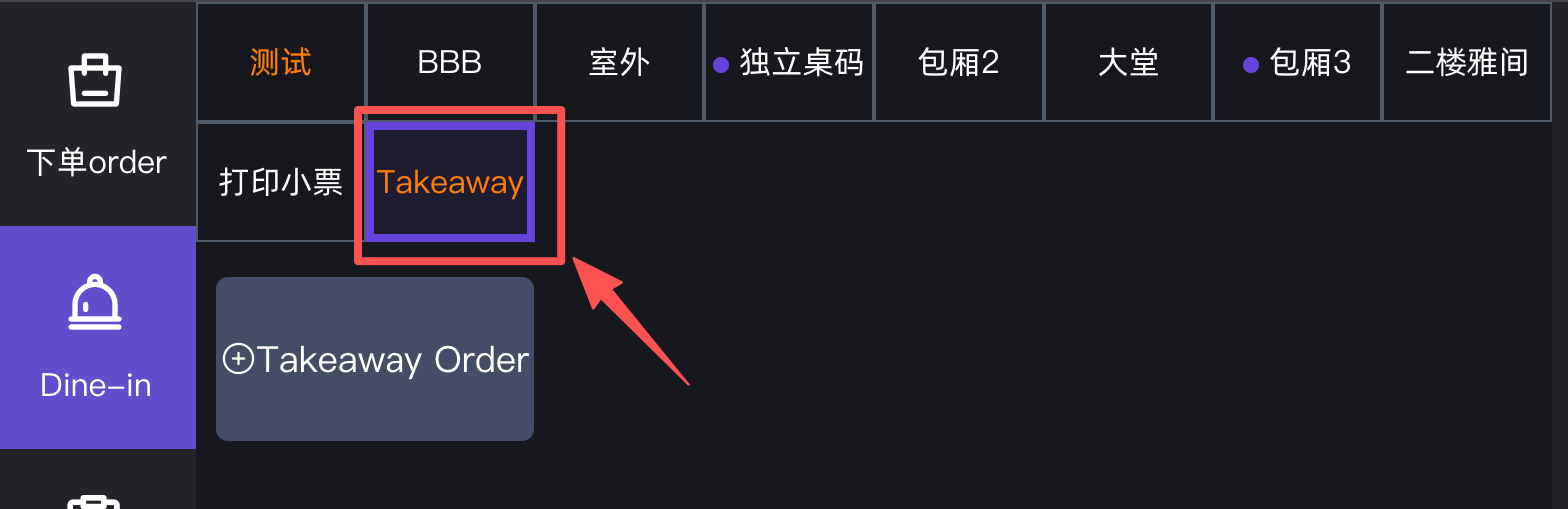 * **【 Members Query 】Password Verification / 【会员查询】密码验证** * **Description (配置含义)**: Adds a security verification layer when searching for member profiles. <br> 在查询会员档案时增加一层安全验证。 * **POS Effect (前端效果)**: If 'Yes', The system will prompt the cashier to enter the authorization password or PIN code. Upon successful verification, the member page will be displayed on the POS screen.<br> 如果选“是”,系统将提示收银员输入授权密码或 PIN 码,验证通过后 POS 屏幕才会员页面。 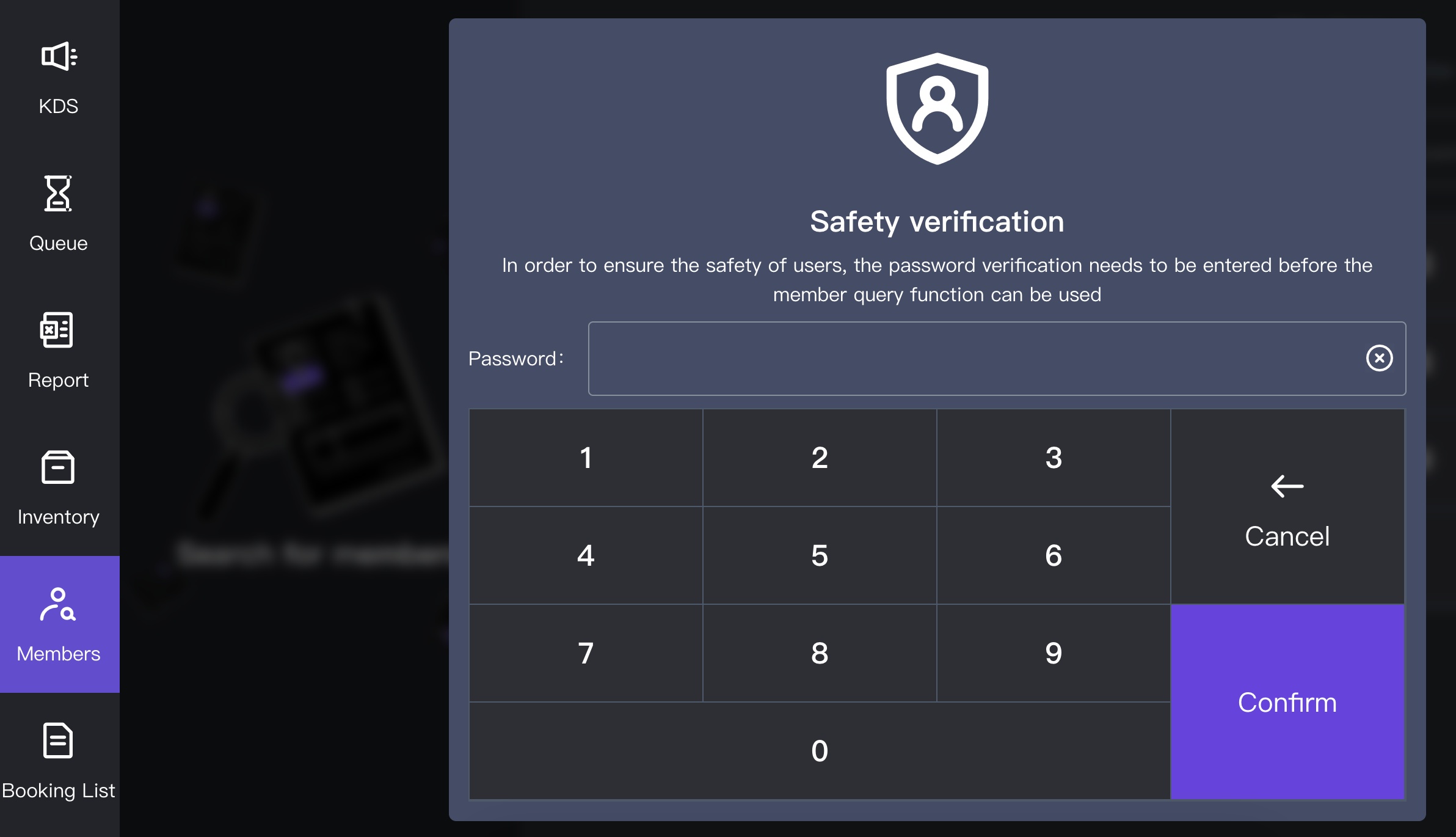 * **[Send Voucher] Password Verification / 【发送优惠券】密码验证** * **Description (配置含义)**: Secures the manual coupon and voucher distribution feature. <br> 保护手动派发优惠券和代金券的功能。 * **POS Effect (前端效果)**: If 'Yes', the cashier must input an authorized password to successfully send or apply a manual voucher to a customer's account at the POS, preventing unauthorized giveaways. <br> 如果选“是”,收银员在 POS 端必须输入授权密码才能成功向顾客账户发送或应用手动优惠券,防止未经授权的赠送。 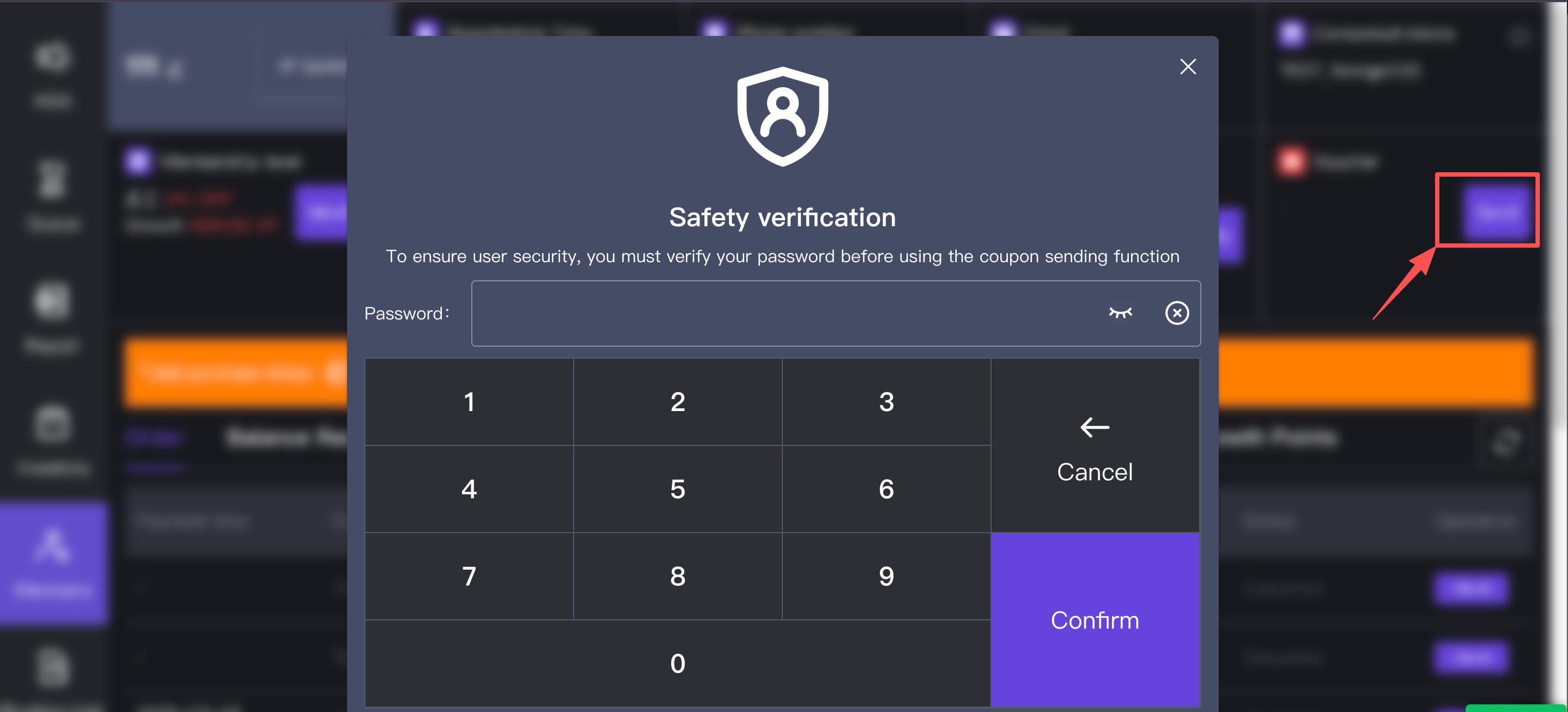 * **Preview is supported for report receipts / 报表小票是否支持预览** * **Description (配置含义)**: Enables a print preview step for end-of-day or shift reports. <br> 为日结或班次报表启用打印预览步骤。 * **POS Effect (前端效果)**: If "Yes" is selected, a report preview will be displayed on the POS screen when the cashier views reports. Printing will only be carried out via the thermal printer after confirmation. <br> 如果选“是”,当收银员在 POS 上查看报表时,屏幕上会先展示报表预览,确认后再由热敏打印机进行物理打印。 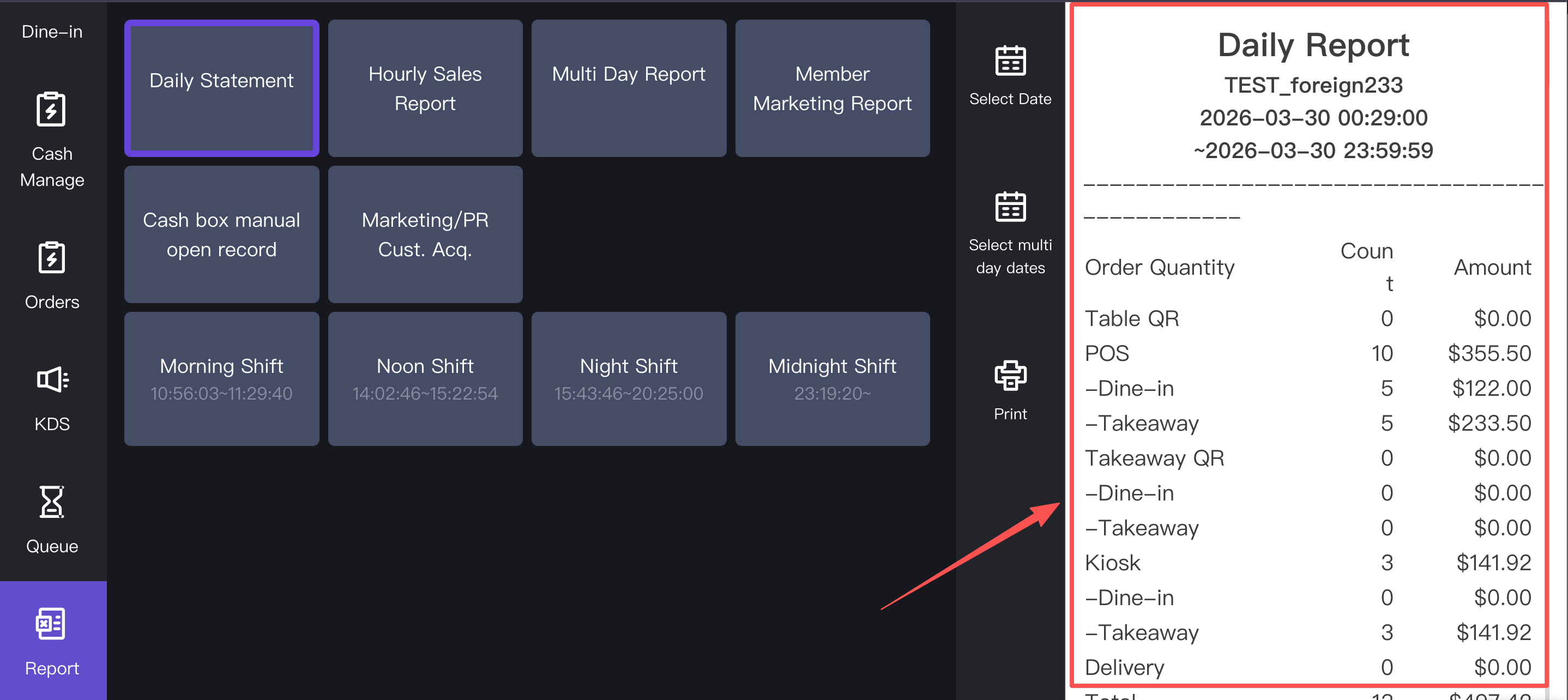 * **Payment secondary confirmation / 支付二次确认** * **Description (配置含义)**: Adds a confirmation prompt to prevent accidental payment processing for specific payment methods. <br> 增加确认提示,以防止特定支付方式发生意外的扣款处理。 * **POS Effect (前端效果)**: If 'Yes', when the cashier clicks the buttons for balance collection (Biz Points), cash payment, or system-recorded payments on the checkout screen, a secondary pop-up will appear asking "Are you sure?" to reduce human error. <br> 如果选“是”,当收银员在结账屏幕上点击商业积分收款、现金支付或系统记录支付按钮时,系统会弹出一个二次确认的弹窗(类似“确定要支付吗?”),以减少人为失误。 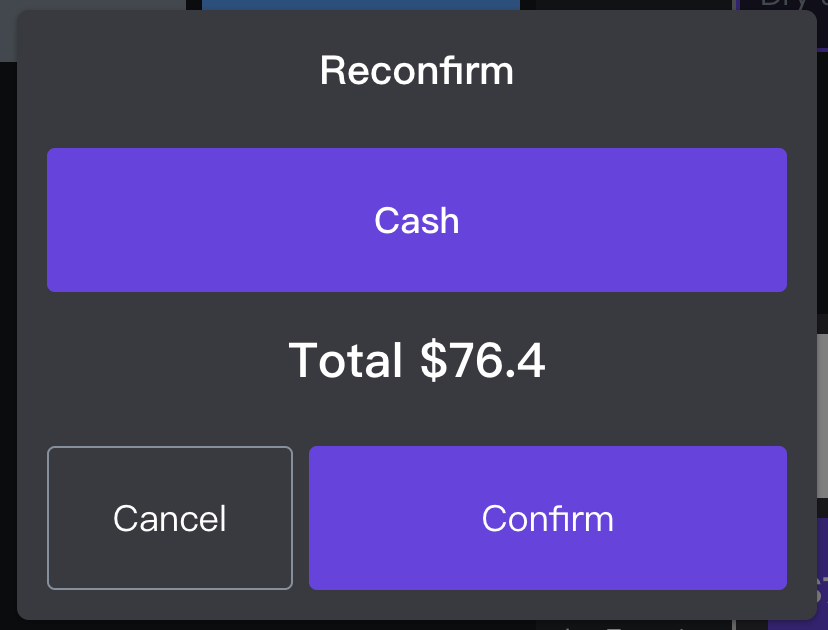 * **Show full name for member payment / 会员买单是否展示全名** * **Description (配置含义)**: Controls customer privacy regarding name display during checkout. <br> 控制结账期间关于姓名显示的顾客隐私。 * **POS Effect (前端效果)**: If 'Yes', the member's full registered name is openly displayed on the POS interface during the payment flow. If 'No', the name may be partially masked. <br> 如果选“是”,会员的完整注册姓名将在支付流程中公开显示在 POS 界面上。如果选“否”,姓名可能会被部分隐藏(打星号)。 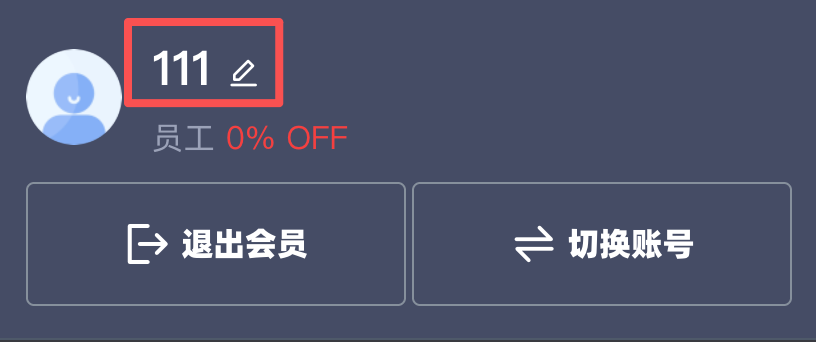 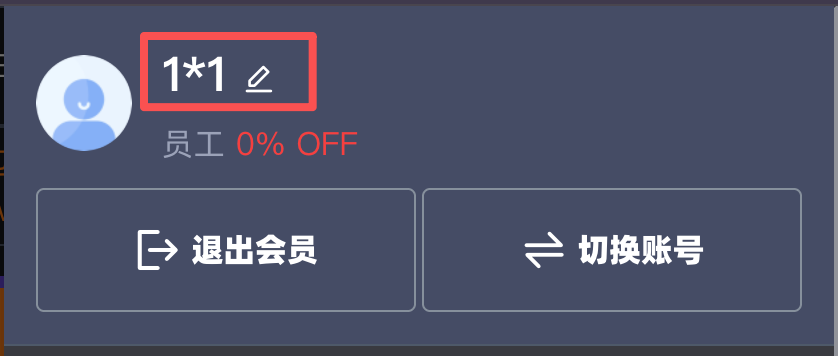 * **Whether to enable product search / 是否开启商品搜索** * **Description (配置含义)**: Toggles the keyword search bar functionality on the menu. <br> 切换菜单上的关键字搜索栏功能。 * **POS Effect (前端效果)**: If 'Yes', a search bar appears on both the dine-in and takeout ordering interfaces on the POS. Cashiers can quickly locate items by typing keywords instead of manually browsing through categories. <br> 如果选“是”,POS 的堂食和打包点餐界面上都会出现一个搜索栏。收银员可以通过输入关键字快速定位菜品,而无需手动浏览分类。 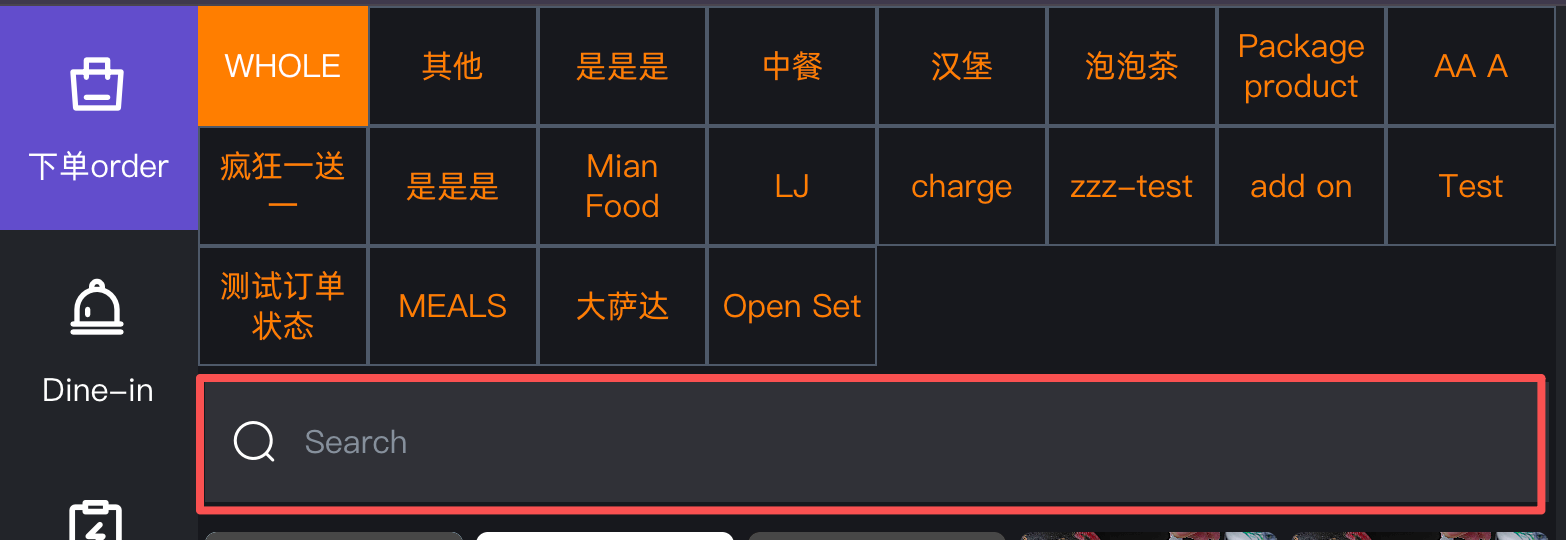 * **Turn on other international area codes for mobile phones / 是否支持其他手机国际区号** * **Description (配置含义)**: Expands the country code options for member registration and login at the POS. <br> 扩展 POS 端会员注册和登录的国际区号选项。 * **POS Effect (前端效果)**: If 'Yes', cashiers can register or look up tourists and expats using foreign mobile numbers. However, the system bypasses SMS OTP (One-Time Password) verification for these non-local numbers. <br> 如果选“是”,收银员可以使用外国手机号码为游客和外籍人士注册或查询会员。但是,系统将不会对这些非本地号码进行短信 OTP(一次性密码)验证。 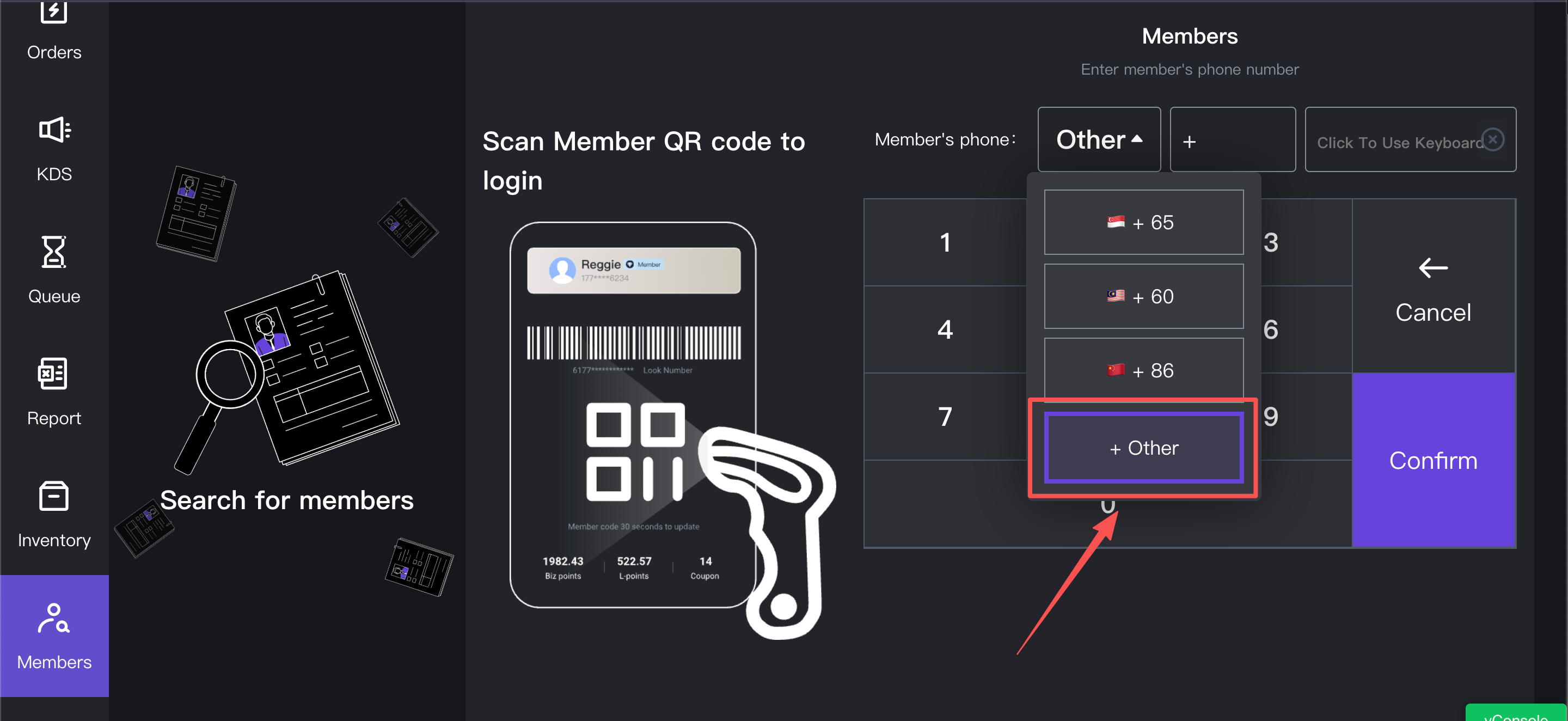 #### Pre-Kitchen Check 收银复核设置 * **Is the 'Pre-Kitchen Check' enabled at the checkout counter / 是否在收银台开启“收银复核”** * **Description (配置含义)**: Enables an intermediate order review step before sending food tickets to the kitchen (KDS or Printers). <br> 启用一个中间的订单审查步骤,然后再将出菜单发送到后厨(KDS 或打印机)。 * **POS Effect (前端效果)**: If 'Yes', a "Pre-Kitchen Check" toggle or button becomes available on the POS terminal. The cashier can hold an order for final review and must manually release it to the kitchen. This is highly useful for managing large groups or complex orders that require double-checking before preparation begins. <br> 如果选“是”,在H5上下单后,收银员需要将订单进行核对,并且必须手动将其释放到后厨。 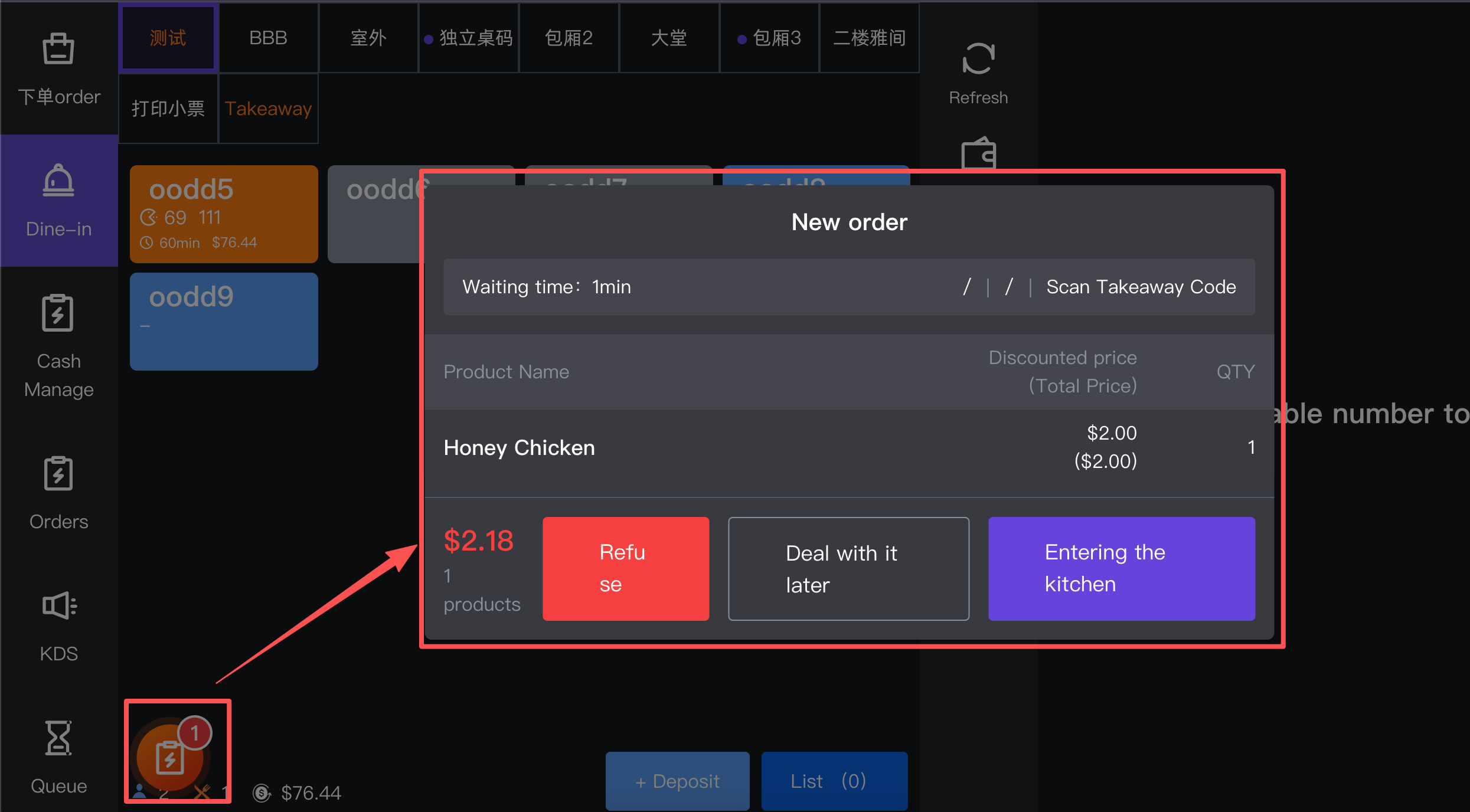 #### Action Area 操作区 * **Submit / 提交** * **Description (配置含义)**: Saves all modifications made on this page. <br> 保存此页面上所做的所有修改。 * **POS Effect (前端效果)**: Once clicked, the backend saves the new configurations. The cashier terminal must usually be refreshed or re-logged into for the new settings to take effect visually on the POS screens. <br> 点击后,后台将保存新的配置。通常需要刷新收银终端或重新登录,新设置才能在 POS 屏幕的视觉和功能上生效。 --- ### 2. Frequently Asked Questions (FAQ) 常见问题 * **Q: Why is OTP verification bypassed when using international mobile numbers?** **Q:为什么使用国际手机号码时会跳过 OTP 验证?** * **A:** Sending international SMS incurs high variable costs and faces stricter telecommunication regulations across different regions. To ensure a smooth and immediate checkout experience for tourists at the POS, the system automatically bypasses the OTP requirement for non-local area codes. **A:** 发送国际短信会产生较高的可变成本,并面临不同地区更严格的电信法规。为了确保游客在 POS 端获得流畅、即时的结账体验,系统会自动跳过非本地号段的 OTP 验证要求。 * **Q: What is the exact workflow if "Pre-Kitchen Check" is enabled?** **Q:如果启用了“收银复核”,确切的工作流程是怎样的?** * **A:** Normally, the moment an order is placed and paid, tickets print in the kitchen instantly. With Pre-Kitchen Check enabled, the cashier takes the order and payment, but the kitchen does *not* receive the ticket yet. The cashier must go to a "Review" or "Pending" screen, verify the items with the customer one last time, and hit a specific "Send to Kitchen" button to fire the tickets. **A:** 通常情况下,订单下达并支付的瞬间,后厨就会立即打印出菜单。启用收银复核后,收银员完成点餐和收款,但后厨*不会*立刻收到单子。收银员必须进入“待复核/待出单”屏幕,最后一次与顾客核对菜品,然后点击特定的“发送至后厨”按钮来触发印单。
pos
2026年3月30日 18:49
转发文档
收藏文档
上一篇
下一篇
手机扫码
复制链接
手机扫一扫转发分享
复制链接
Markdown文件
PDF文档(打印)
分享
链接
类型
密码
更新密码